> For the complete documentation index, see [llms.txt](https://docs.overdare.com/llms.txt). Markdown versions of documentation pages are available by appending `.md` to page URLs; this page is available as [Markdown](https://docs.overdare.com/korean/manual/script-manual/get-started/luau-guide.md).
# 루아우 가이드
## 개요
OVERDARE Studio는 Lua를 기반으로 확장된 스크립팅 언어인 Luau를 사용합니다. Luau는 Lua와 대부분의 문법과 기능을 그대로 유지하면서도, 타입 선언과 타입 추론, 복합 대입 연산자, 단축 if 표현식 등 다양한 기능이 추가되어 있습니다.
이러한 확장 덕분에 개발자는 더 안전하고 유연한 방식으로 로직을 구성할 수 있으며, 높은 수준의 생산성과 표현력을 동시에 확보할 수 있습니다.
## 특이사항
* 타입 명시에 따른 **자동 완성 기능은 현재 부분적으로만 지원**되며, 일부 정보는 자동 완성 목록에 표시되지 않을 수 있습니다.
* **타입 추론 기능은 현재 부분적으로만 지원**되며, 일부 타입은 제대로 인식하지 못할 수 있습니다.
## 타입 선언
### 변수
**local 변수를 선언**할 때, 변수명 뒤에 아래와 같이 타입을 지정할 수 있습니다.\
(글로벌 변수 선언에는 사용할 수 없습니다.)
```lua
local Gold: number = 1
```
### 함수
함수의 **인자**나 **반환값**에도 아래와 같이 타입을 지정할 수 있습니다.\
(글로벌 함수에도 사용할 수 있습니다.)
```lua
local function Sum(a: number, b: number): number
return a + b
end
print(Sum(1, 2))
function AddScalarToVector3(v: Vector3, scalar: number): Vector3
return Vector3.new(v.X + scalar, v.Y + scalar, v.Z + scalar)
end
local Pos = Vector3.new(50, 0, 10)
print(AddScalarToVector3(Pos, 100))
```
### 가변 인자 함수
**...**와 같은 가변 인자에도 타입을 지정할 수 있습니다.
```lua
--!nonstrict
local function Sum(...: number): number
local t, result = {...}, 0
for i = 1, #t do
result += t[i]
end
return result
end
print(Sum(1, 2, 2, 5))
```
### 테이블
테이블 타입은 **{}**로 정의하며, 중괄호 안에 각 필드의 타입을 명시함으로써 테이블에 구성되는 값의 타입을 고정할 수 있습니다.
```lua
--!nonstrict
local SomeList: {} = { 1, false, "Hello" }
local NumberList: { number } = { 1, 2, 3, 4, 5 }
NumberList[2] = false -- Type 'boolean' could not be converted into 'number'
```
테이블 타입은 **키와 값의 타입**을 각각 정의할 수도 있습니다.
```lua
local BoolList: { [string]: boolean } =
{
Key1 = false,
Key2 = true
}
BoolList["Key2"] = 2 -- Type 'number' could not be converted into 'boolean'
```
### 인스턴스
Player나 Part, Instance 같은 **객체**도 타입을 지정할 수 있습니다.
```lua
--!nonstrict
local function InitPlayer(player: Player)
player:SetAttribute("Score", 0)
end
local function SetRandomColor(target: Part)
local r = math.random(1, 255)
local g = math.random(1, 255)
local b = math.random(1, 255)
target.Color = Color3.fromRGB(r, g, b)
end
local function RemoveAllAttributes(target: Instance)
for key, value in target:GetAttributes() do
target:SetAttribute(key, nil)
end
end
```
## 타입 검사
### 자동 완성 연동
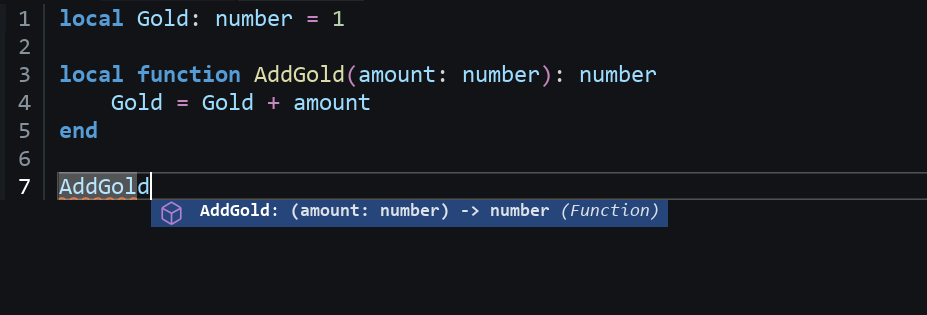
변수나 함수에 타입을 선언하면, 코드를 작성할 때 **자동 완성 기능**에 타입 정보가 함께 표시되어 오류를 사전에 방지하고 코드의 유지보수성을 높일 수 있습니다.
### 타입 추론 모드
**스크립트 상단**에서 --!nonstrict와 같이 타입 추론 모드를 지정할 수 있습니다.
타입 추론 모드
기능
--!nocheck (기본값)
타입 검사를 완전히 비활성화합니다.
--!nonstrict
명시적으로 지정된 타입에 대해서만 검사합니다.
--!strict
모든 코드에 대해 타입을 추론 및 검사합니다.
#### --!nocheck
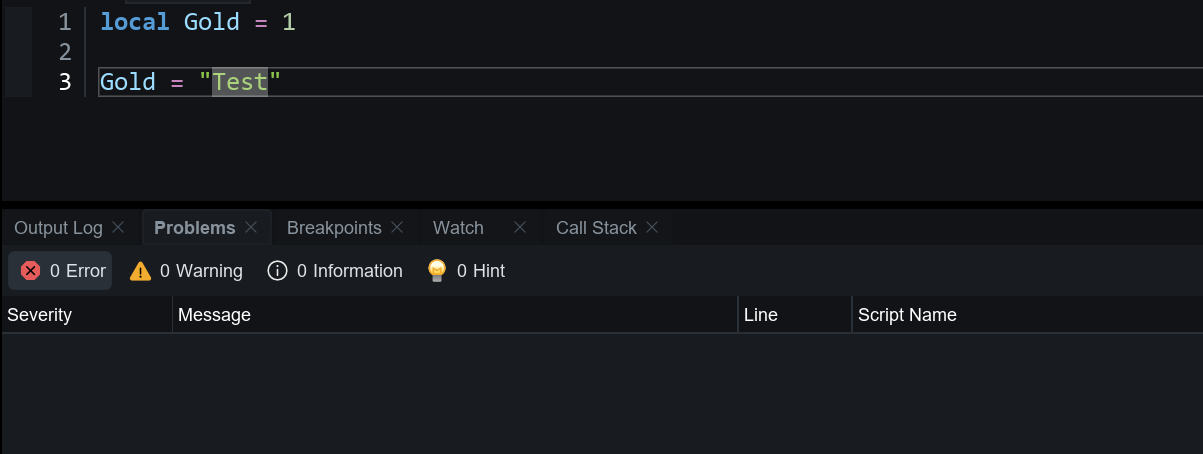
**기본 상태**로 타입 검사가 동작하지 않습니다.\
(타입 오류가 있어도 무시되며, 타입 추론이나 경고도 발생하지 않습니다.)
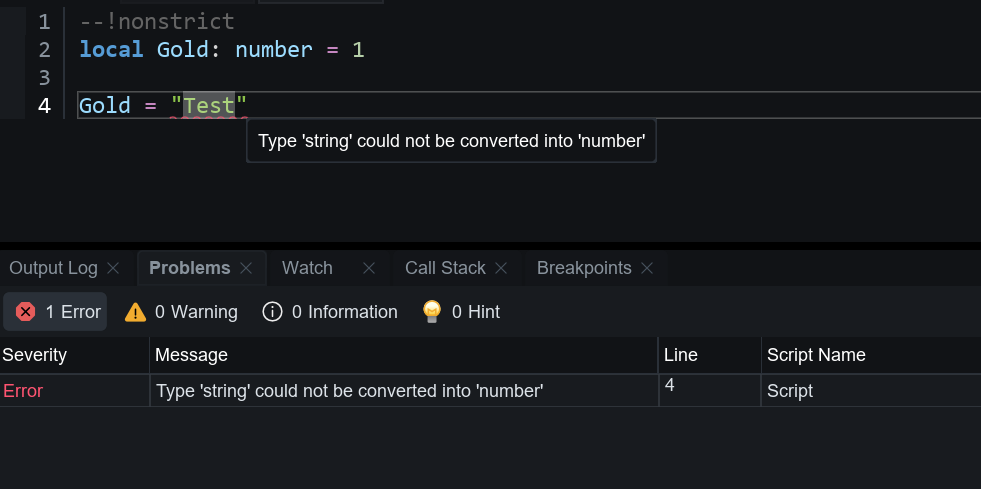
#### --!nonstrict
**명시적으로 지정된 타입**에 대해서만 검사하며, 타입을 지정하지 않은 변수나 함수는 검사하지 않습니다.
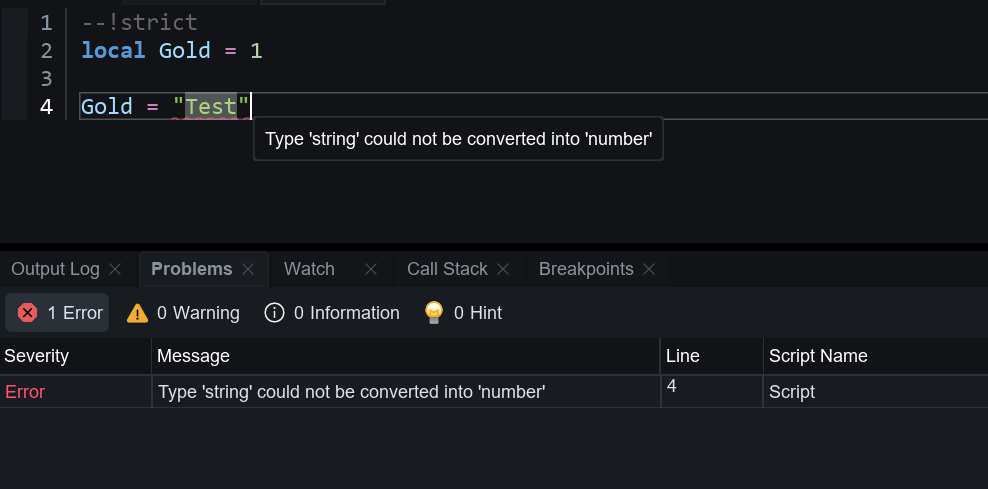
#### --!strict
**모든 코드에 대해 타입을 추론 및 검사**하며, 타입이 명시되지 않은 경우에도 자동으로 추론하여 오류를 검출합니다.
## 유연한 타입 구조
### 선택적 타입
타입 뒤에 **?**를 붙이면 해당 타입을 선택 사항으로 만들 수 있습니다. 선택 사항으로 지정된 타입은 **명시된 타입**과 **nil 값**을 모두 허용합니다.
```lua
--!nonstrict
local NumOrNil: number? = 1
NumOrNil = nil
local Num: number = 1
Num = nil -- Type 'nil' could not be converted into 'number'
```
### 타입 캐스트
서로 다른 타입의 변수에 값을 할당하면 오류가 발생할 수 있습니다. 이 경우 **:: 연산자**를 사용하여 **명시적으로 타입 캐스팅**하면 타입 오류를 피할 수 있습니다.
```lua
--!nonstrict
local SomeNum: number = 100
local NumToString1: string = SomeNum::any
local NumToString2: string = SomeNum -- Type 'number' could not be converted into 'string'
```
### 리터럴 타입 지정
string이나 boolean은 **리터럴 타입**을 지정해 **상수**처럼 사용할 수 있습니다.
```lua
--!nonstrict
local SomeString: "ConstString" = "ConstString"
local SomeBoolean: true = true
SomeString = "Test" -- Type '"Test"' could not be converted into ''"ConstString"''
SomeBoolean = false -- Type 'false' could not be converted into 'true'
```
### 유니언과 교차 타입
유니언과 교차 타입을 사용하면, 하나의 변수에 **여러 타입을 허용**하거나, 여러 타입을 조합해 **새로운 복합 타입**을 정의할 수 있습니다.
**유니언 타입**은 **| 연산자**를 사용하여 **여러 타입 중 하나**의 값을 가질 수 있도록 합니다.
```lua
--!nonstrict
local NumberOrString: number | string = 10
NumberOrString = "Test"
NumberOrString = false -- Type 'boolean' could not be converted into 'number | string'; none of the union options are compatible
local SomeString: "Hello" | "World" = "Hello"
SomeString = "World"
SomeString = "Test" -- Type '"Test"' could not be converted into '"Hello" | "World"'; none of the union options are compatible
```
**교차 타입**은 **& 연산자**를 사용하여 **여러 타입을 조합한 복합 객체**를 정의할 수 있습니다.\
(**type 키워드**를 사용하여 각각의 타입을 먼저 정의한 후 조합해야 합니다.)
```lua
type Type1 = { Name: string }
type Type2 = { Value: number }
local StringAndNumber: Type1 & Type2 = { Name = "Hello", Value = 10 }
local StringAndNumber: Type1 & Type2 = { Name = "Hello", OtherKey = 10 }
--[[
Type
'StringAndNumber'
could not be converted into
'Type1 & Type2'
caused by:
Not all intersection parts are compatible.
Table type 'StringAndNumber' not compatible with type 'Type2' because the former is missing field 'Value'
]]--
```
## 구문 및 표현식
### 복합 대입 연산자
아래 표에 나열된 복합 대입 연산자를 사용하면, **연산과 대입을 하나의 구문으로 처리**할 수 있어 코드를 더 간결하고 효율적으로 작성할 수 있습니다.
단, 다른 언어와 달리 print(a += 2)와 같은 **표현식 내에서는 사용할 수 없으며**, 반드시 a += 2처럼 별도의 문으로 분리해서 작성해야 합니다.
연산자
기능
+=
a = a + b
-=
a = a - b
*=
a = a * b
/=
a = a / b
//=
a = a // b
%=
a = a % b
^=
a = a ^ b
..=
a = a .. b
```lua
local Value = 3
Value += 1 -- 4
local Value = 3
Value -= 1 -- 2
local Value = 3
Value *= 2 -- 6
local Value = 3
Value /= 2 -- 1.5
local Value = 3
Value //= 2 -- 1
local Value = 3
Value %= 2 -- 1
local Value = 3
Value ^= 2 -- 9
local Text = "Hello"
Text ..= " World!" -- Hello World!
```
### 단축 if
리터럴 값을 조건 분기 내에 삽입하여, 조건에 따라 즉시 **값을 반환**할 수 있습니다.
```lua
local RandomNum = math.random(1, 2)
local Result = if RandomNum == 1 then "true" else "false"
print(RandomNum, " -> ", Result)
```
### continue 키워드
for나 while과 같은 반복문 내에서 **continue 키워드**를 사용하면, 현재 반복을 건너뛰고 다음 반복으로 즉시 넘어갈 수 있습니다.
```lua
for i = 1, 5 do
if i > 3 then
continue
end
print(i)
end
```
### 문자열 보간
**backticks(\`)**을 사용하여 중괄호 내에 **변수나 표현식**을 동적으로 삽입할 수 있습니다.
```lua
local ItemName = "Sword"
local ItemPrice = 2000
print(`ItemName : {ItemName} / ItemPrice : {ItemPrice}`) -- ItemName : Sword / ItemPrice : 2000
```
## 반복문
### Generic For Loops
ipairs나 pairs와 같은 반복자를 명시적으로 사용하지 않아도, **for ... in 구문**을 통해 테이블과 같은 컬렉션을 직접 순회할 수 있으며, **배열**이나 **딕셔너리** 형태에도 적용할 수 있습니다.
```lua
local NumberList = { 1, 2, 3 }
for key, value in NumberList do
print(key, " : ", value)
end
```
```lua
local PlayerData =
{
Name = "Player",
Level = 5,
IsValid = true,
EquipItemIDList =
{
1, 3
}
}
for key, value in PlayerData do
print(key, " : ", value)
end
```
### Generalized Iteration
**\_\_iter 메타메서드**를 사용하면, 테이블 자체에 반복자 로직을 내장시켜 **사용자 정의 순회 동작**을 구현할 수 있습니다.
```lua
--!nonstrict
local NumberList = { 1, 5, 11, 4, 9 }
local SortedIterator =
{
__iter = function(t)
local sorted = table.clone(t)
table.sort(sorted)
local i = 0
return function()
i += 1
if i <= #sorted then
return i, sorted[i]
end
end
end
}
setmetatable(NumberList, SortedIterator)
for key, value in NumberList do
print(key, " : ", value)
end
```
## 사용자 정의 타입
### Type
**type 키워드**로 사용자 정의 타입을 선언할 수 있으며, 이를 통해 몬스터, 스킬, 타일 등 복잡한 데이터 구조를 보다 효율적이고 안전하게 관리할 수 있습니다.
```lua
--!nonstrict
type Car =
{
Name: string,
Speed: number,
Drive: (Car, boolean) -> () -- function
}
local function DriveFunc(self, useBooster)
print(self.Name, "Speed : ", self.Speed, " / useBooster : ", useBooster)
end
local Taxi: Car =
{
Name = "Taxi",
Speed = 30,
Drive = DriveFunc
}
Taxi:Drive(true)
```
또한, **하나의 함수 타입을 여러 함수에 재사용함으로써** 함수 구조를 일관되게 유지를 유지하고, **다양한 기능을 확장**하는 데 활용할 수 있습니다.
```lua
--!nonstrict
type MathFunc = (number, number) -> number
local Sum: MathFunc = function(a, b)
return a + b
end
local Multiply: MathFunc = function(a, b)
return a * b
end
```
### Type Exports
**export type 키워드**를 사용하면, 모듈 스크립트 내에서 정의한 타입들을 외부에서 사용할 수 있도록 분리하여 관리할 수 있습니다.
```lua
--!nonstrict
export type Item =
{
Name: string,
Price: number
}
export type Skill =
{
Name: string,
IsActiveSkill: boolean
}
```
```lua
--!nonstrict
local ReplicatedStorage = game:GetService("ReplicatedStorage")
local ModuleScript = require(ReplicatedStorage.ModuleScript)
local SomeItem: ModuleScript.Item =
{
Name = "Sword",
Price = 10
}
print(SomeItem)
local SomeSkill: ModuleScript.Skill =
{
Name = "FireBall",
IsActiveSkill = true
}
print(SomeSkill)
```
## Generic
### 제네릭
**\**를 이용한 제네릭 타입을 정의하면, 입력되는 타입을 **동적으로 지정**할 수 있어 하나의 타입 정의로 다양한 형태의 데이터를 유연하게 표현하고 재사용할 수 있습니다.
```lua
--!nonstrict
type SomeData =
{
Name: string,
Value: T
}
local NumberData: SomeData =
{
Name = "Test1",
Value = 15
}
print(NumberData.Name, " / ", NumberData.Value)
local BooleanData: SomeData =
{
Name = "Test1",
Value = false
}
print(BooleanData.Name, " / ", BooleanData.Value)
```
### 함수 제네릭
함수의 **매개변수**에 제네릭을 활용하면 전달되는 데이터의 타입을 **호출 시점에 동적으로 지정**할 수 있어,\
코드 재사용성과 타입 안정성을 동시에 확보할 수 있습니다.
```lua
--!nonstrict
type SomeList = { T }
local NameList: SomeList = { "Bob", "Dan", "Mary" }
local NumberList: SomeList = { 1, 2, 3 }
local function printList(list: SomeList)
for key, value in list do
print(key, " : ", value)
end
end
printList(NameList)
printList(NumberList)
```
## 라이브러리
Lua의 기본 라이브러리 중에서 io, package 등이 제거되고, **table, string 등의 기능이 확장**되었습니다.\
(라이브러리에 대한 자세한 내용은 추후 제공될 예정입니다.)
### Table 복제 기능
```lua
local T1 = { 1, 2, 3 }
local T2 = table.clone(T1)
T1[1] = 10
print(T1[1])
print(T2[1])
```
### 문자열 Split 기능
```lua
local SomeString = "Hello,World"
local Splits = SomeString:split(",")
print(Splits[1], Splits[2])
```
### Coroutine 종료
```lua
local co = coroutine.create(function()
for i = 1, 5 do
wait(1)
print(i)
end
end)
coroutine.resume(co)
wait(4)
coroutine.close(co)
```
### Task
```lua
local SomeTask = task.spawn(function()
for i = 1, 10 do
wait(2)
print(i)
end
end)
print("wait 5s")
local elapsed = task.wait(5)
task.cancel(SomeTask)
print("cancel! / elapsed : ", elapsed)
```
자세히 알아보기
{% content-ref url="/pages/glEfW0aAlqjyCwG0sg5p" %}
[task로 편리하게 coroutine 제어하기](/korean/manual/script-manual/advanced-gameplay-systems/task.md)
{% endcontent-ref %}