# 월드 상품 판매

## 개요

크리에이터는 Marketplace 기능을 활용하여 골드, 크리스탈과 같은 **게임 내 재화**나 총, 탄약, 회복 물약 등의 **아이템**을 월드 상품으로 구성하여 사용자에게 **판매**할 수 있습니다.

## 판매자의 의무

크리에이터는 판매한 상품이 구매자에게 **정상적으로 지급되도록 처리할 의무**가 있습니다. 지급 누락이나 설명과 다른 상품 구성, 구매한 상품의 가치 훼손 등 **문제가 발생한 경우**, 반드시 이에 대한 적절한 해결 조치를 **성실히 이행**해야 합니다. 지급 의무를 불성실하게 이행하거나 관련 신고가 반복적으로 접수될 경우, 정산 보류, 월드 제재, 나아가 계정 비활성화 등의 **불이익이 발생**할 수 있습니다.

자세히 알아보기

{% content-ref url="/pages/p0hyzbFWf4iszJBVf21a" %}
[월드 상품 가이드라인](/korean/overdare/policy/world-product-guidelines.md)
{% endcontent-ref %}

### 문의 창구 설정

상품 판매가 포함된 월드는 **반드시 소셜 링크를 설정**해야 하며, 이는 크리에이터가 상품 관련 문의에 대해 플레이어와 직접 소통할 수 있도록 하기 위함입니다.

**소셜 링크가 설정되지 않은 월드는 상품 등록을 할 수 없습니다.**

<figure><img src="/files/39u4Hxw8Q8ad7Tzl8N2b" alt=""><figcaption></figcaption></figure>

등록한 소셜 링크는 OVERDARE App에서 월드를 클릭하면 노출되는 팝업에서 **Detail 버튼**을 누르면 노출됩니다.

<figure><img src="/files/19lDMYlWFPRLnU92xvn9" alt=""><figcaption></figcaption></figure>

## 상품 종류

<table><thead><tr><th width="152.33331298828125">상품 종류</th><th>용도</th><th>예시</th></tr></thead><tbody><tr><td>World Product</td><td>1회성으로 지급되는 재화, 아이템 등의 상품</td><td><p>재화 지급(골드, 크리스탈 등)</p><p>아이템 지급(검, 도끼, 회복 포션 등)</p><p>소모성 아이템(부활, 건물 즉시 설치권 등)</p></td></tr></tbody></table>

## 상품 관리

상품은 월드별로 구성되며, 각각 개별적으로 설정할 수 있습니다.

상품을 등록하고 관리하려면 **월드를 먼저 Publish**해야 합니다. 월드를 Publish 할 때 Owner group을 그룹으로 설정하면 그룹원과 함께 상품을 관리하고 수익을 분배할 수 있습니다.

### 권한별 기능

<table><thead><tr><th width="274">권한</th><th width="150.333251953125">상품 조회/등록</th><th width="162.0001220703125">상품 수정</th><th>수익 분배</th></tr></thead><tbody><tr><td>월드제작자(개인 월드)</td><td>O</td><td>O</td><td>O</td></tr><tr><td>Group Owner(그룹 월드)</td><td>O</td><td>O</td><td>O</td></tr><tr><td>Group Member(그룹 월드)</td><td>O</td><td>X</td><td>X</td></tr></tbody></table>

### 상품 목록 확인

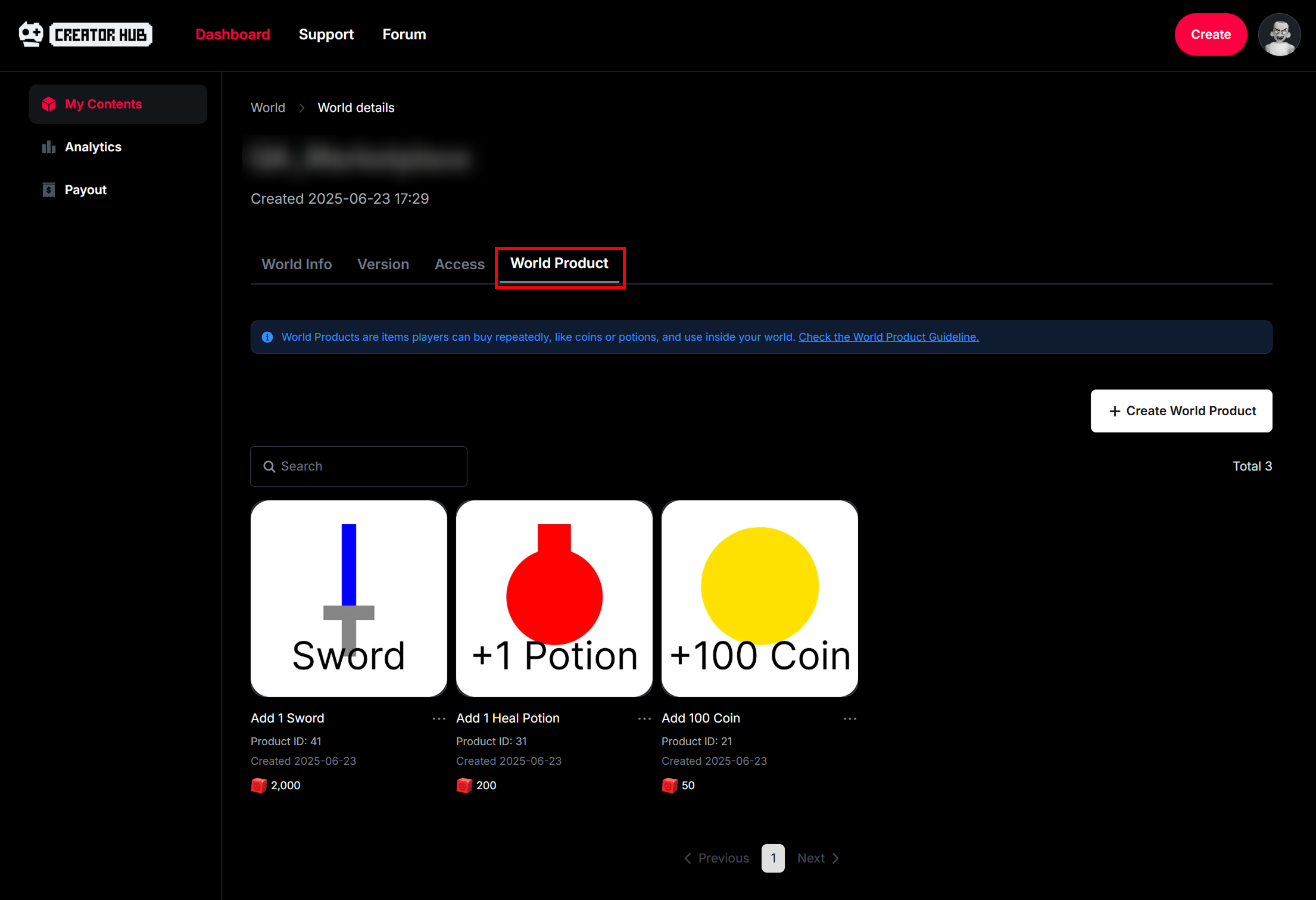
Dashboard의 World 탭에서 월드를 클릭하여 월드 페이지에 진입한 다음, **World Product 탭**을 클릭하면 등록한 상품을 확인할 수 있습니다.

<figure><img src="/files/1tUAJoV5dUfFQ4dMMnp4" alt=""><figcaption></figcaption></figure>

### 상품 등록

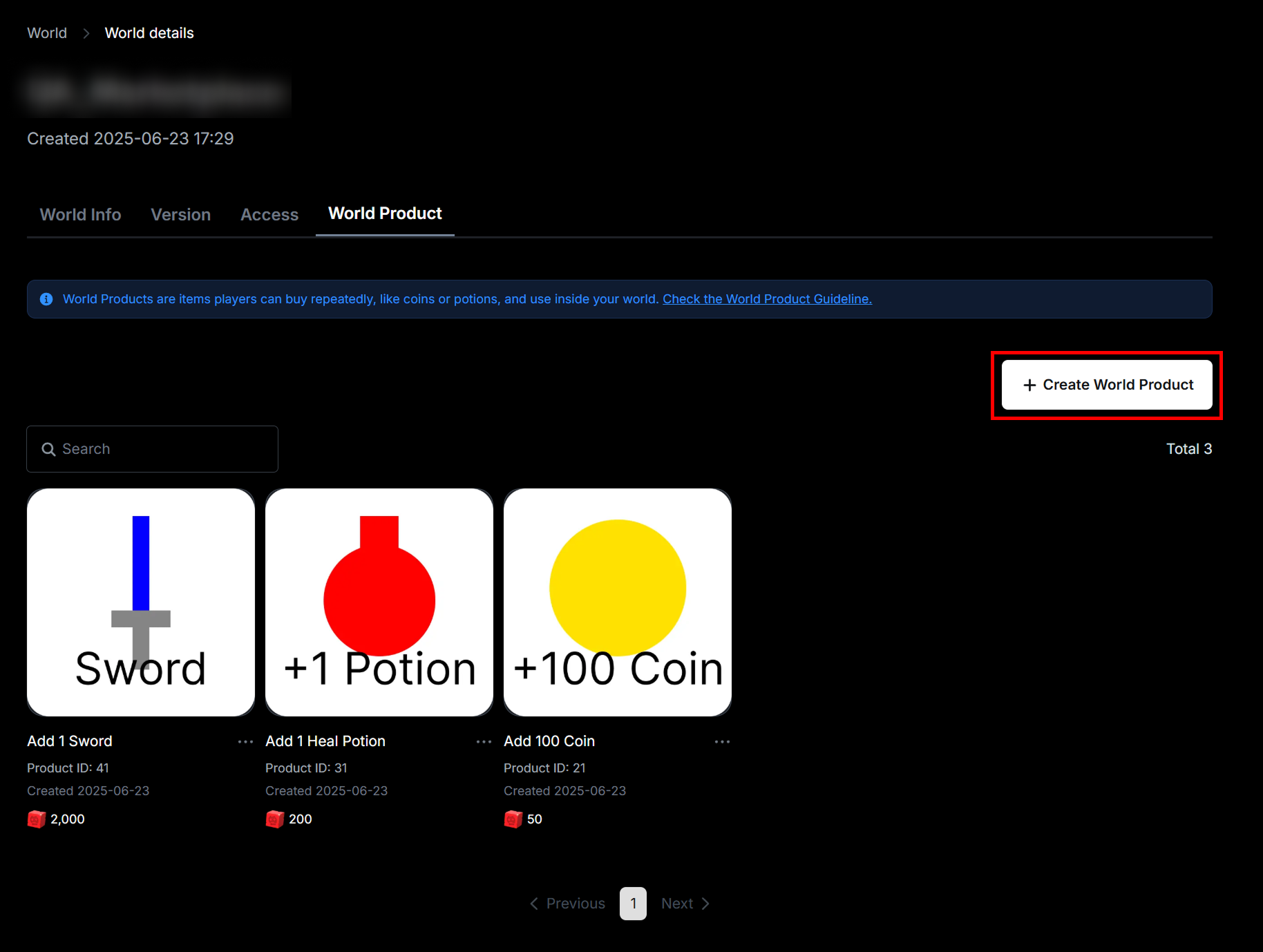
**+ Create World Product 버튼**을 눌러 새로운 상품을 등록할 수 있습니다.

<figure><img src="/files/k8bffkIYrNVQr55Bpk4G" alt=""><figcaption></figcaption></figure>

<figure><img src="/files/B3H1oNDxJGcJ8N1X9qf5" alt=""><figcaption></figcaption></figure>

### 상품 ID 복사하기

각 상품 이름 옆에 표시되는 **... 버튼**을 누른 다음, **Copy Product Id**를 클릭해서 상품 ID를 복사할 수 있습니다.

<figure><img src="/files/2v2I9dQnHWuPD57pEnfV" alt=""><figcaption></figcaption></figure>

### 상품 수정

상품 이미지나 이름 영역을 클릭하여 상품의 이미지, 이름, 가격 등을 수정할 수 있습니다.

<figure><img src="/files/jsf4FqKV8OqMq9zbTzRN" alt=""><figcaption></figcaption></figure>

{% hint style="warning" %}
유저에게 **이미 구매창이 출력된 상태**에서 상품 수정이 발생하면, 결제시에 **이전 정보(가격)**&#xC73C;로 처리됩니다.
{% endhint %}

## 상품 판매를 위한 스크립트 처리

Marketplace를 통한 상품 구매 기능은 **유저의 재화를 소모하는 중요 기능**이므로, pcall 등을 활용한 **엄격한 예외 처리와 디버깅이 필수적**입니다. 이를 통해 런타임 오류나 네트워크 지연 등의 상황에서도 **시스템의 안정성을 유지**할 수 있으며, 아이템 미지급과 같은 **치명적인 문제를 사전에 방지**할 수 있습니다.

### 기능 목록

<table><thead><tr><th width="348.3333740234375">기능</th><th>설명</th></tr></thead><tbody><tr><td>GetProductInfo(productId, productType)</td><td>특정 상품 정보 요청</td></tr><tr><td>GetWorldProductsAsync()</td><td>모든 월드 상품 정보 요청</td></tr><tr><td>PromptProductPurchase(player, productId)</td><td>구매 요청</td></tr><tr><td>PromptProductPurchaseFinished</td><td>구매창이 꺼질 때 필요한 이벤트 처리</td></tr><tr><td>ProcessReceipt</td><td>구매 성공시 상품 지급 처리 후, 정상 지급건의 <strong>영수증 상태를 완료로 변경</strong>하기 위한 이벤트</td></tr></tbody></table>

### 특정 상품 정보 요청(GetProductInfo)

상품 ID(productId)와 상품 타입(Enum.InfoType)에 해당하는 상품 정보를 반환합니다.

```lua
local MarketplaceService = game:GetService("MarketplaceService")

local function Request_GetProductInfo(productId)
    local success, errorOrProductInfo = pcall(function()
        return MarketplaceService:GetProductInfo(productId, Enum.InfoType.Product)
    end)
    
    if not success then
        print("Error: " .. errorOrProductInfo .. " / ProductId : " .. productId)
        
    else
        local productInfo = errorOrProductInfo 
        print("World Product Name: " .. tostring(productInfo.Name))
        print("ProductId: " .. tostring(productInfo.ProductId))
        print("ProductType: " .. tostring(productInfo.ProductType))
        print("PriceInBLUC: " .. tostring(productInfo.PriceInBLUC))
        print("Description: " .. tostring(productInfo.Description))
        print("Created: " .. productInfo.Created)
        print("Updated: " .. productInfo.Updated)
        
        -- UI에 출력
    end
end
```

### 모든 월드 상품 정보 요청(GetWorldProductsAsync)

모든 월드 상품에 대한 정보를 포함하는 Pages 객체를 반환합니다.

```lua
local MarketplaceService = game:GetService("MarketplaceService")

local function Request_GetWorldProductsAsync()
    local success, errorOrWorldProducts = pcall(function()
        return MarketplaceService:GetWorldProductsAsync()
    end) 
    
    if not success then
        print("Error: " .. errorOrWorldProducts)
        
    else
        local worldProducts = errorOrWorldProducts
        
        local pageCount = 1	  
        local dataList = {}
			
        while true do
            local currentPage = worldProducts:GetCurrentPage()	
		    
            -- 마지막 페이지이면 루프 탈출 
            if worldProducts.IsFinished or currentPage == nil then           	
                print(pageCount .. " page IsFinished : " .. tostring(worldProducts.IsFinished))
                break
            else
                worldProducts:AdvanceToNextPageAsync()
                pageCount = pageCount + 1
            end
	    
            -- 한 페이지에 최대 100개의 상품 정보 구성
            for _, productInfo in pairs(currentPage) do		
                local i = #dataList + 1
				
                print("------ " .. i .. " ------")
                print("World Product Name: " .. tostring(productInfo.Name))
                print("ProductId: " .. tostring(productInfo.ProductId))
                
                print("ProductType: " .. tostring(productInfo.ProductType))
                print("PriceInBLUC: " .. tostring(productInfo.PriceInBLUC))
                print("Description: " .. tostring(productInfo.Description))
                print("Created: " .. productInfo.Created)
                print("Updated: " .. productInfo.Updated)
	
                table.insert(dataList, productInfo)
		
                -- UI에 출력
            end
        end
    end
end
```

### 구매 요청(PromptProductPurchase)

월드 상품 ID(productId)에 해당하는 상품의 구매를 요청합니다.\
(시스템 UI로 구매창이 출력됩니다.)

```lua
local MarketplaceService = game:GetService("MarketplaceService")

local function Request_PromptProductPurchase(player, productId)
    local success, error = pcall(function()
        MarketplaceService:PromptProductPurchase(player, productId)
    end)
	
    if not success then
        print("Error: " .. error .. " / ProductId : " .. productId)        
    end	
end
```

### 구매창 꺼질 때(PromptProductPurchaseFinished)

구매 요청(PromptProductPurchase)을 통해 출력된 구매창이 꺼질 때 이벤트가 호출되며, 구매를 성공하면 isPurchased에 true가 전달되고, 구매를 취소하거나 실패하면 false가 전달됩니다.

이 이벤트는 구매 창을 닫았는지 감지하기 위한 용도로만 사용해야 하며, <mark style="color:red;">**구매한 상품에 대한 지급 처리 용도로는 절대 사용하지 않아야 합니다.**</mark>

```lua
local Players = game:GetService("Players")
local MarketplaceService = game:GetService("MarketplaceService")

local function OnPromptPurchaseFinished(userId, productId, isPurchased)
    local player = Players:GetPlayerByUserId(userId)
    
    print(player.Name .. " / ProductID : " .. productId .. " / isPurchased : " .. tostring(isPurchased))
end
MarketplaceService.PromptProductPurchaseFinished:Connect(OnPromptPurchaseFinished)
```

### 구매 성공시 지급 처리(ProcessReceipt)

구매 성공한 상품 중에서 아직 **지급 처리가 되지 않은 영수증** 정보를 반환하는 이벤트가 호출됩니다.

#### 영수증 상태

<table><thead><tr><th width="175.6666259765625">상태</th><th width="193.3333740234375">설명</th><th>재호출 여부</th></tr></thead><tbody><tr><td>NotProcessedYet</td><td>상품 <strong>미지급</strong> 상태</td><td>호출 조건에 따라 <strong>다시 호출될 수 있음</strong></td></tr><tr><td>PurchaseGranted</td><td>상품 <strong>지급</strong> 완료 상태</td><td>다시 호출되지 않음</td></tr></tbody></table>

#### 호출 조건

* 월드 상품을 성공적으로 구매했을 때(구매 성공 팝업이 사용자에게 표시되었을 때)
  * 미처리 상품이 있는 상태에서 새로운 상품 구매시, **이전 미처리건도 함께 호출**됩니다.
* 사용자가 서버에 **접속(재접속)**&#xD588;을 때

#### 지급 상태 변경 방법

* 상품 지급 처리 후에, Enum.ProductPurchaseDecision.**PurchaseGranted**를 반환합니다.

#### 주의사항

* ProcessReceipt 이벤트 연결은 **서버측 Script에서 한 번만** 설정해야 합니다.
* 이 콜백은 시간 제한 없이 **yield 가능**하며, 서버가 실행 중인 한 응답이 돌아올 때까지 유효합니다.
* 미지급된 영수증이 여러개인 경우 **각각 호출**되며, 콜백 호출 순서는 비결정적(non-deterministic)입니다.
* 사용자가 **서버에 있어야** 콜백이 호출됩니다.
  * 단, 콜백의 결과는 사용자가 서버에 없어도 백엔드에 기록될 수 있습니다.
* 콜백에서 **PurchaseGranted**를 반환해도 백엔드 기록이 실패할 수 있으며, 이런 경우 영수증의 상태는 변경되지 않습니다. (미지급 상태 유지)
* **미지급 상태**의 상품은 자금이 **지급 보류 상태(Escrow)**&#xB85C; 보관됩니다.

```lua
local Players = game:GetService("Players")
local MarketplaceService = game:GetService("MarketplaceService")

local ProductDeliverer = {}

-----------------------------------------------------------------------------
-- 아래와 같이 테이블에 상품 번호 별로 함수를 구성하여 상품마다 지급 로직을 구현할 수 있습니다.
ProductDeliverer[여기에 상품 번호를 넣으세요.] = function(player)
    local success, resultOrError = pcall(function()
        -- player에게 상품 지급 및 DataStore를 이용한 저장 처리 
        
        -- Tip.
        -- DataStore로 상품 정보를 저장할 때는 
        -- 네트워크 충돌이나 경쟁 상태(race condition)를 방지하기 위해
        -- IncrementAsync 또는 UpdateAsync로 처리하는 것을 권장합니다.
                
        -- 지급 및 저장 처리가 성공적으로 완료된 경우 true 반환
        return true
    end)
    
    if success and resultOrError then
        return true
        
    else
        return false, resultOrError
    end
end

-----------------------------------------------------------------------------
-- 상품 구매 성공시 호출되는 영수증 처리용 콜백
local function OnProcessReceipt(receiptInfo)	
    -- 영수증 정보
    local success, error = pcall(function()	
        print("PurchaseId: " .. receiptInfo.PurchaseId)
        print("UserId: " .. receiptInfo.PlayerId)
        print("ProductId: " .. receiptInfo.ProductId)
        print("CurrencySpent: " .. receiptInfo.CurrencySpent)
        print("PurchaseDateTime: " .. receiptInfo.PurchaseDateTime)
    end)
    
    if not success then
        print("Error: " .. tostring(error))
        return Enum.ProductPurchaseDecision.NotProcessedYet
    end
    
    -- 플레이어가 유효하면
    local productId = receiptInfo.ProductId        
    local userId = receiptInfo.PlayerId
    
    local player = Players:GetPlayerByUserId(userId)  
    if player == nil then
        print("Error: player is nil")
        return Enum.ProductPurchaseDecision.NotProcessedYet	
    end  
    
    -- 상품 지급 함수 호출
    local delivererFunc = ProductDeliverer[productId]
    local success, error = delivererFunc(player)
    
    -- 상품 지급 성공시
    if success then
        -- 지급 완료 상태 반환
        print("Item delivery successful / ProductId : " .. productId)
        return Enum.ProductPurchaseDecision.PurchaseGranted
        
    -- 상품 지급 실패시
    else
        print("Error: " .. tostring(error))
        return Enum.ProductPurchaseDecision.NotProcessedYet
    end
end
MarketplaceService.ProcessReceipt = OnProcessReceipt
```

## 테스트 구매

스튜디오의 테스트 플레이 환경에서도 상품 구매 및 지급 처리를 확인할 수 있습니다.\
(재화가 차감되지 않습니다.)

## 수익 통계

수익 통계 정보는 **UTC 기준 00:00 시간**에 매일 갱신되며, Dashboard의 Analytics 탭에서 **총 수익(Total Revenue)**&#xACFC; **월드별 수익(Revenue열)**&#xC744; 확인할 수 있습니다.

<figure><img src="/files/VI2IiEAffU3GhWPPRdAq" alt=""><figcaption></figcaption></figure>

월드 이름 영역을 클릭하여 **Analytics Overview 페이지**에 진입한 다음, 본문 하단의 **Revenue Summmary 영역**에서 상품별 판매 수익을 확인할 수 있습니다.

<figure><img src="/files/PzS2GAVfJLxL8oNlx6wp" alt=""><figcaption></figcaption></figure>

### 지급 상태 등 영수증 정보 확인하기

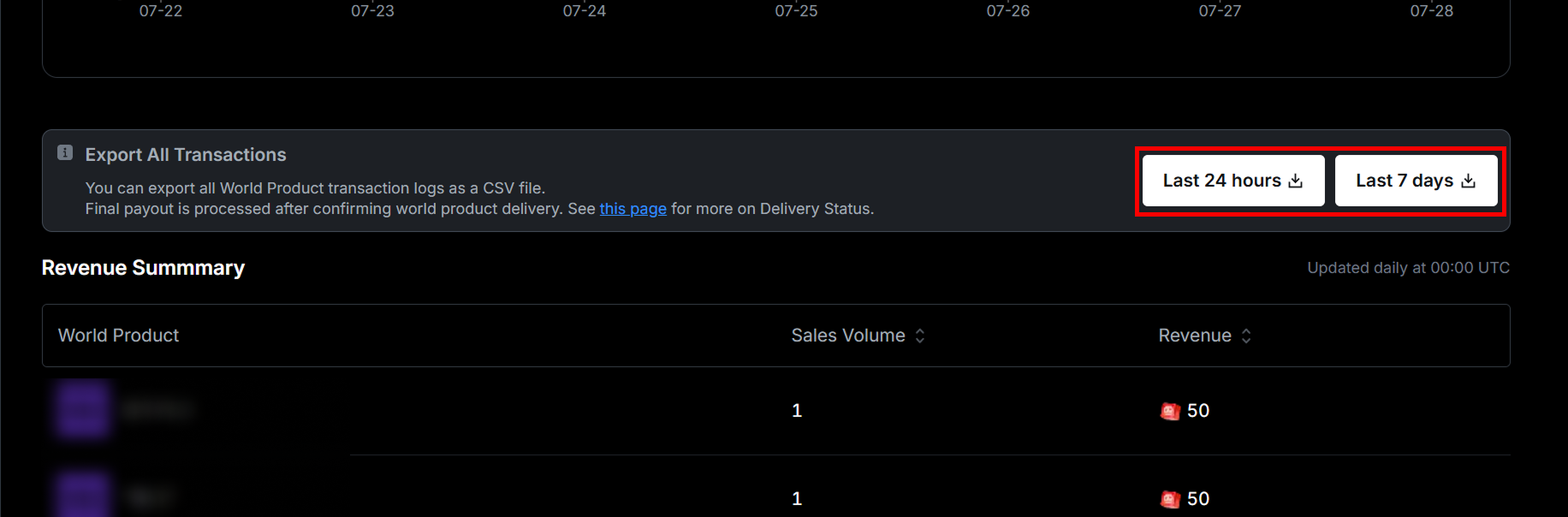
**Export All Transactions 영역**의 표시한 버튼을 눌러 판매한 상품의 지급 상태, 판매 날짜, 구매자 이름 및 Account ID 등 **영수증 정보**를 csv 파일로 확인할 수 있습니다.

<figure><img src="/files/GJtVSTXo9ZBMkZyCxM07" alt=""><figcaption></figcaption></figure>

<figure><img src="/files/Xbe8Rr4QFPPmBpSgKhPf" alt=""><figcaption></figcaption></figure>

#### DeliveryStatus

csv 파일 내 지급 상태(DeliveryStatus)의 각 항목에 대한 설명은 아래 표를 참고하세요.

<table><thead><tr><th width="189">상태</th><th width="366">설명</th><th>점검 항목</th></tr></thead><tbody><tr><td>DELIVERED</td><td>스크립트에서 지급이 정상적으로 처리되었으며, 영수증 서버에서도 상태가 지급으로 변경됨</td><td></td></tr><tr><td>DELIVERY_FAILED</td><td>스크립트에서 지급 처리 중 실패를 반환했거나, 영수증 서버에서 상태 변경 처리에 실패함</td><td>스크립트 점검<br>구매자에게<br>월드 재입장 안내</td></tr><tr><td>CALLBACK_MISSING</td><td>스크립트에서 ProcessReceipt가 정의되지 않음</td><td>스크립트 점검</td></tr></tbody></table>

## 수익

### 수익 분배

{% content-ref url="/pages/vIuz03CGYQeBfMuE0Utt" %}
[그룹 수익 분배 가이드](/korean/manual/monetization/group-revenue-distribution-guideline.md)
{% endcontent-ref %}

### 수익 정산

{% content-ref url="/pages/5nW1Jg0kAdz5SSBKMvee" %}
[개인 정산 가이드](/korean/manual/monetization/payout-guideline.md)
{% endcontent-ref %}

## 활용 예시

* **인게임 재화**를 무료/유료로 구분한 뒤, 유료 재화의 가치를 높이고 월드 상품으로 판매하여 사용자 구매를 유도하고 수익을 촉진할 수 있습니다.
* 일반 스킨보다 **더 높은** **퀄리티의 스킨**을 월드 상품으로 구성하면, 플레이어의 개성과 꾸미기 욕구를 자극하여 구매로 이어질 수 있습니다.
* **무기, 포션, 재화** 등을 묶은 **패키지 상품**을 구성하면, 개별 아이템 대비 높은 가성비를 통해 구매 전환율을 높일 수 있습니다.
* 전투 중 사망했을 때 즉시 부활할 수 있는 **소모성 아이템**을 월드 상품으로 구성하면, 게임 흐름을 유지하면서 자연스러운 구매를 유도할 수 있습니다.
* **시즌 패스**와 같은 지속형 상품을 통해 장기적인 사용자 리텐션과 수익을 동시에 확보할 수 있습니다.
* 유료 상품 위주의 과도한 구성보다는, 일정 수준의 **무료 상품을 적절히 제공**하여 사용자 만족도를 높이고, 신뢰를 바탕으로 한 자발적인 구매를 유도하는 것이 더욱 효과적입니다.


---

# Agent Instructions: Querying This Documentation

If you need additional information that is not directly available in this page, you can query the documentation dynamically by asking a question.

Perform an HTTP GET request on the current page URL with the `ask` query parameter:

```
GET https://docs.overdare.com/korean/manual/monetization/marketplace.md?ask=<question>
```

The question should be specific, self-contained, and written in natural language.
The response will contain a direct answer to the question and relevant excerpts and sources from the documentation.

Use this mechanism when the answer is not explicitly present in the current page, you need clarification or additional context, or you want to retrieve related documentation sections.