# Luau Guide

## Overview

OVERDARE Studio uses Luau, a scripting language extended from Lua. While preserving most of Lua's syntax and functionality, Luau introduces a wide range of features, such as Type Annotations, Type Inference, Compound Assignment, and If Expressions.

These extensions allow developers to write safer and more flexible logic while maintaining high productivity and expressiveness.

## Note

* Type-based **autocompletion is partially supported at the moment**, and some information may not appear in the autocomplete list.
* **Type inference is partially supported at the moment**, and some types may not be accurately recognized.

## Type Annotations

### Variables

**When declaring local variables**, you can specify their types as below (except when declaring global variables).

```lua
local Gold: number = 1
```

### Functions

You can specify function parameters and return values' types as below (can be used for global functions).

```lua
local function Sum(a: number, b: number): number
    return a + b	
end
print(Sum(1, 2))

function AddScalarToVector3(v: Vector3, scalar: number): Vector3
    return Vector3.new(v.X + scalar, v.Y + scalar, v.Z + scalar)
end
local Pos = Vector3.new(50, 0, 10)
print(AddScalarToVector3(Pos, 100))
```

### Variadic Functions

Even variadic functions such as (**...**) can be annotated with types.

```lua
--!nonstrict
local function Sum(...: number): number
    local t, result = {...}, 0
    for i = 1, #t do
        result += t[i]
    end
    return result
end
print(Sum(1, 2, 2, 5))
```

### Tables

Table types can be defined using **{}**, and you can specify the types for each field in braces to fix the types of values found in a table.

```lua
--!nonstrict
local SomeList: {} = { 1, false, "Hello" }

local NumberList: { number } = { 1, 2, 3, 4, 5 }
NumberList[2] = false -- Type 'boolean' could not be converted into 'number'
```

Table type can also define the **types of key and values**.

```lua
local BoolList: { [string]: boolean } = 
{ 
    Key1 = false, 
    Key2 = true 
}
BoolList["Key2"] = 2 -- Type 'number' could not be converted into 'boolean'
```

### Instance

**Objects** such as Player, Part, and Instance can also be assigned with types.

```lua
--!nonstrict
local function InitPlayer(player: Player)
    player:SetAttribute("Score", 0)    
end

local function SetRandomColor(target: Part)
    local r = math.random(1, 255)
    local g = math.random(1, 255)
    local b = math.random(1, 255)
    target.Color = Color3.fromRGB(r, g, b)
end

local function RemoveAllAttributes(target: Instance)
    for key, value in target:GetAttributes() do
        target:SetAttribute(key, nil)
    end
end
```

## Type Checking

### Autocomplete Integration

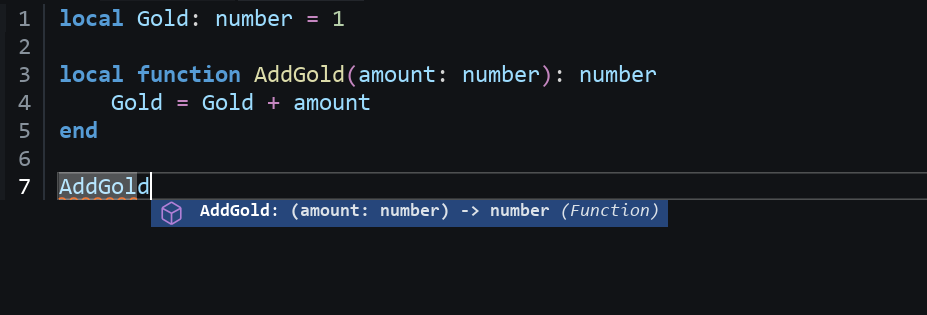
By declaring types for variables or functions, the **autocomplete function** will also display type information while coding, preventing errors and improving code maintainability.

<figure><img src="https://2064130887-files.gitbook.io/~/files/v0/b/gitbook-x-prod.appspot.com/o/spaces%2FhrvYlLq1mQAq0V0vwPsb%2Fuploads%2Fgit-blob-1c5e3f2e4501dd6f6513ed3879c1950d525f798a%2Fimage.png?alt=media" alt=""><figcaption></figcaption></figure>

### Inference Modes

You can specify the type inference modes such as --!nonstrict at the **top of the script.**

<table><thead><tr><th width="173.33331298828125">Inference Modes</th><th>Features</th></tr></thead><tbody><tr><td>--!nocheck (default)</td><td><strong>Completely disables</strong> type checking.</td></tr><tr><td>--!nonstrict</td><td>Checks only the <strong>explicitly specified types</strong>.</td></tr><tr><td>--!strict</td><td><strong>Infers and checks types for every code</strong>.</td></tr></tbody></table>

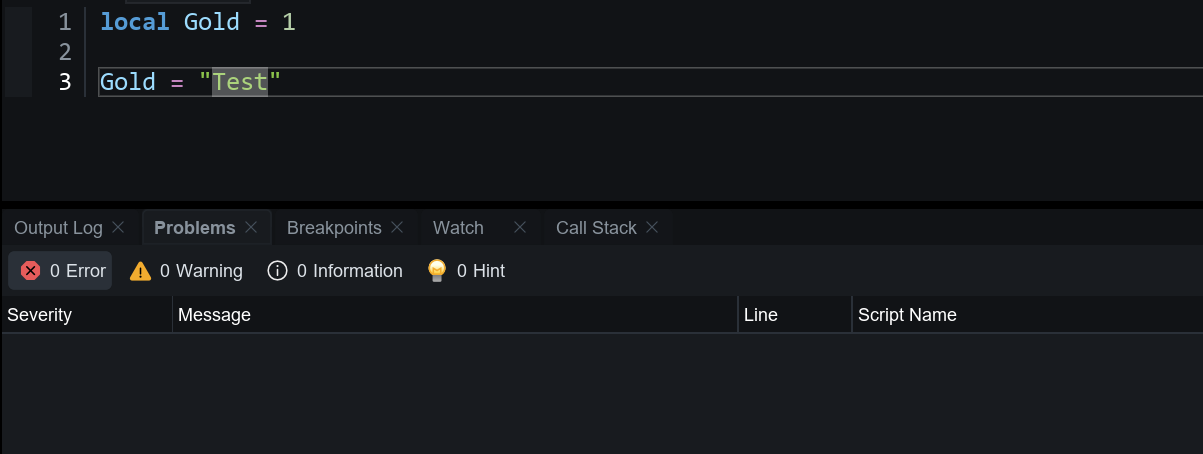
#### --!nocheck

The **default state** where type checking does not function. (Type errors are ignored, and type inference or warnings do not occur.)

<figure><img src="https://2064130887-files.gitbook.io/~/files/v0/b/gitbook-x-prod.appspot.com/o/spaces%2FhrvYlLq1mQAq0V0vwPsb%2Fuploads%2Fgit-blob-e8ec0f643c25390cb28ab99076618fe4e9b410aa%2Fimage.png?alt=media" alt=""><figcaption></figcaption></figure>

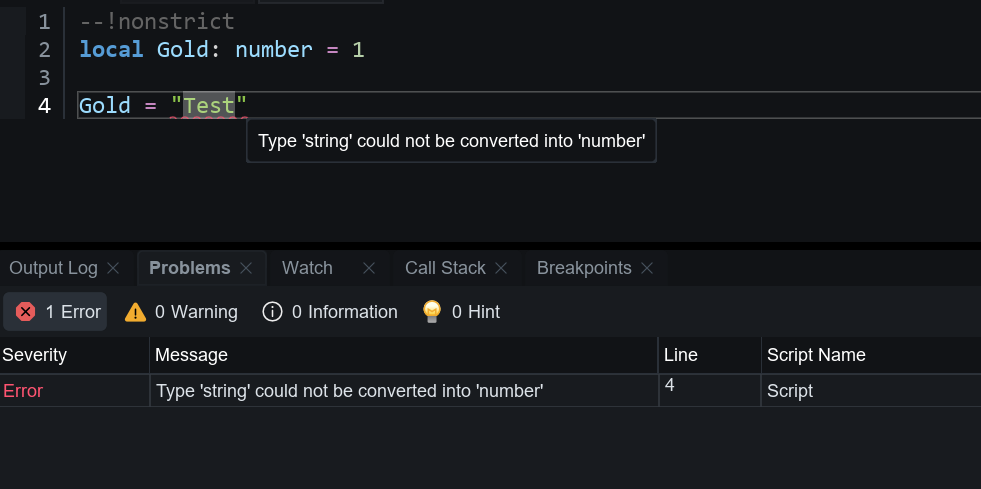
#### --!nonstrict

Checks only **explicitly specified types**, and skips variables or functions without specified types.

<figure><img src="https://2064130887-files.gitbook.io/~/files/v0/b/gitbook-x-prod.appspot.com/o/spaces%2FhrvYlLq1mQAq0V0vwPsb%2Fuploads%2Fgit-blob-bad86eb5d9b4feb2c6a238dc3b6917e558f9a442%2Fimage.png?alt=media" alt=""><figcaption></figcaption></figure>

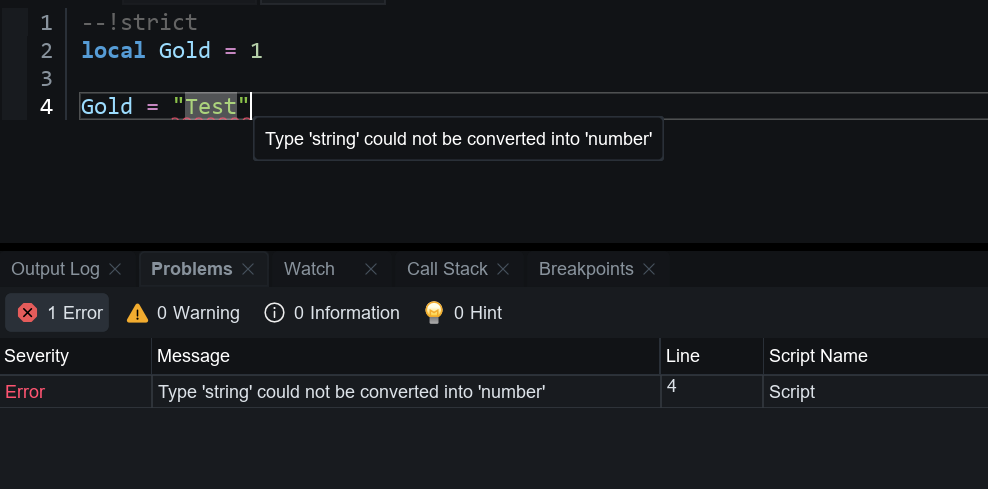
#### --!strict

**Infers and checks types for every code.** Even without specified types, it infers automatically to detect errors.

<figure><img src="https://2064130887-files.gitbook.io/~/files/v0/b/gitbook-x-prod.appspot.com/o/spaces%2FhrvYlLq1mQAq0V0vwPsb%2Fuploads%2Fgit-blob-3d198df54f6abd811b5aa75cf8130f1fe635dae2%2Fimage.png?alt=media" alt=""><figcaption></figcaption></figure>

## Flexible Type System

### Optional Type

Appending **?** after a type makes it optional. Optional types accept both the **specified types** and **nil values**.

```lua
--!nonstrict
local NumOrNil: number? = 1
NumOrNil = nil

local Num: number = 1
Num = nil -- Type 'nil' could not be converted into 'number'
```

### Type Cast

An error may occur if you assign values to variables of different types. In such cases, you can explicitly **cast the type** using the **:: operator** to avoid type errors.

```lua
--!nonstrict
local SomeNum: number = 100

local NumToString1: string = SomeNum::any
local NumToString2: string = SomeNum -- Type 'number' could not be converted into 'string'
```

### Literal Type Specification

Types such as string or boolean can be specified as **literals**, allowing them to be used like **constants**.

```lua
--!nonstrict
local SomeString: "ConstString" = "ConstString"
local SomeBoolean: true = true

SomeString = "Test"  -- Type '"Test"' could not be converted into ''"ConstString"''
SomeBoolean = false  -- Type 'false' could not be converted into 'true'
```

### Unions and intersections

Using union and intersection types, you can allow a variable to **accept multiple types** or define a **new composite type** by combining multiple types.

**Union types use the | operator** to allow a variable to have a **single value among multiple types**.

```lua
--!nonstrict
local NumberOrString: number | string = 10
NumberOrString = "Test"
NumberOrString = false -- Type 'boolean' could not be converted into 'number | string'; none of the union options are compatible

local SomeString: "Hello" | "World" = "Hello"
SomeString = "World"
SomeString = "Test" -- Type '"Test"' could not be converted into '"Hello" | "World"'; none of the union options are compatible
```

**Intersection types** use the **& operator** to define a **composite object type by combining multiple types**. (Each type must be defined using the **type keyword** before combining.)

```lua
type Type1 = { Name: string }
type Type2 = { Value: number }
local StringAndNumber: Type1 & Type2 = { Name = "Hello", Value = 10 }

local StringAndNumber: Type1 & Type2 = { Name = "Hello", OtherKey = 10 }
--[[
Type
  'StringAndNumber'
could not be converted into
  'Type1 & Type2'
caused by:
  Not all intersection parts are compatible.
  Table type 'StringAndNumber' not compatible with type 'Type2' because the former is missing field 'Value'
]]--
```

## Syntax & Expressions

### Compound Assignment

You can use compound assignment listed in the table below to **combine operations and assignments into a single statement,** which allows code to be written more concisely and efficiently.

However, unlike in other languages, compound assignments **cannot be used in expressions** such as print (a += 2). They must be written as separate statements like a += 2.

<table><thead><tr><th width="146.333251953125">Operator</th><th>Features</th></tr></thead><tbody><tr><td>+=</td><td>a = a + b</td></tr><tr><td>-=</td><td>a = a - b</td></tr><tr><td>*=</td><td>a = a * b</td></tr><tr><td>/=</td><td>a = a / b</td></tr><tr><td>//=</td><td>a = a // b</td></tr><tr><td>%=</td><td>a = a % b</td></tr><tr><td>^=</td><td>a = a ^ b</td></tr><tr><td>..=</td><td>a = a .. b</td></tr></tbody></table>

```lua
local Value = 3
Value += 1 -- 4

local Value = 3
Value -= 1 -- 2

local Value = 3
Value *= 2 -- 6

local Value = 3
Value /= 2 -- 1.5

local Value = 3
Value //= 2 -- 1

local Value = 3
Value %= 2 -- 1

local Value = 3
Value ^= 2 -- 9

local Text = "Hello"
Text ..= " World!" -- Hello World!
```

### if Expressions

You can insert literal values within conditional branches to **return values** immediately based on the conditions.

```lua
local RandomNum = math.random(1, 2)
local Result = if RandomNum == 1 then "true" else "false"
	
print(RandomNum, " -> ", Result)
```

### continue Keyword <a href="#continue" id="continue"></a>

Within a loop statement such as for or while, the **continue keyword** can be used to skip the current loop and move on to the next.

```lua
for i = 1, 5 do
    if i > 3 then
        continue
    end
    print(i)
end
```

### String interpolation

You can use **backticks (\`)** to dynamically insert **variables or expressions** within braces.

```lua
local ItemName = "Sword"
local ItemPrice = 2000
print(`ItemName : {ItemName} / ItemPrice : {ItemPrice}`) -- ItemName : Sword / ItemPrice : 2000
```

## Loop Statement

### Generic For Loops

Without explicitly using iterators like ipairs or pairs, you can directly traverse collections like tables using the **for ... in syntax**. This can also be applied to **array or dictionary** structures.

```lua
local NumberList = { 1, 2, 3 }
for key, value in NumberList do    
    print(key, " : ", value)
end
```

```lua
local PlayerData = 
{
    Name = "Player",
    Level = 5,
    IsValid = true,
    EquipItemIDList =
    {
        1, 3
    }
}

for key, value in PlayerData do
    print(key, " : ", value)
end
```

### Generalized Iteration

By implementing the **\_\_iter metamethod**, you can embed iterator logic directly within a table, enabling **user-defined iteration behavior**.

```lua
--!nonstrict
local NumberList = { 1, 5, 11, 4, 9 }

local SortedIterator = 
{
    __iter = function(t)
        local sorted = table.clone(t)
        table.sort(sorted)

        local i = 0
        return function()
            i += 1
            if i <= #sorted then
                return i, sorted[i]
            end
        end
    end
}
setmetatable(NumberList, SortedIterator)

for key, value in NumberList do
    print(key, " : ", value)
end
```

## User-Defined Types

### Type

You can declare user-defined types using the **type keyword**. This allows for safer and more efficient management of complex data structures such as monsters, skills, or tiles.

```lua
--!nonstrict
type Car = 
{
    Name: string,
    Speed: number,
    Drive: (Car, boolean) -> () -- function
}

local function DriveFunc(self, useBooster)
    print(self.Name, "Speed : ", self.Speed, " / useBooster : ", useBooster)
end

local Taxi: Car =  
{
    Name = "Taxi",
    Speed = 30, 
    Drive = DriveFunc
}

Taxi:Drive(true)
```

You can also **use a function type across multiple functions**, helping to maintain consistent function structures and **enabling broader extensibility**.

```lua
--!nonstrict
type MathFunc = (number, number) -> number

local Sum: MathFunc = function(a, b)
    return a + b
end

local Multiply: MathFunc = function(a, b)
    return a * b
end
```

### Type Exports

When you use the **export type keyword**, types defined in module scripts can be separated and managed for use outside the module.

```lua
--!nonstrict
export type Item = 
{
    Name: string,
    Price: number
}

export type Skill = 
{
    Name: string,
    IsActiveSkill: boolean
}
```

```lua
--!nonstrict
local ReplicatedStorage = game:GetService("ReplicatedStorage")
local ModuleScript = require(ReplicatedStorage.ModuleScript)

local SomeItem: ModuleScript.Item = 
{
    Name = "Sword",
    Price = 10
} 
print(SomeItem)

local SomeSkill: ModuleScript.Skill = 
{
    Name = "FireBall",
    IsActiveSkill = true
}
print(SomeSkill) 
```

## Generic

### Generics

By defining generic types using **\<T>**, you can **dynamically specify** the input type. This makes it possible to express and reuse various forms of data structures flexibly through a single type definition.

```lua
--!nonstrict
type SomeData<T> = 
{
    Name: string,
    Value: T
}

local NumberData: SomeData<number> = 
{
    Name = "Test1",
    Value = 15
}
print(NumberData.Name, " / ", NumberData.Value)

local BooleanData: SomeData<boolean> = 
{
    Name = "Test1",
    Value = false
}
print(BooleanData.Name, " / ", BooleanData.Value)
```

### Function Generics

By applying generics to a function's **parameters**, the type of the data being passed can be dynamically specified **at the time of the function call,** enabling both high code reusability and type safety.

```lua
--!nonstrict
type SomeList<T> = { T }

local NameList: SomeList<string> = { "Bob", "Dan", "Mary" }
local NumberList: SomeList<number> = { 1, 2, 3 }

local function printList<T>(list: SomeList<T>)
    for key, value in list do
        print(key, " : ", value)
    end
end

printList(NameList)
printList(NumberList)
```

## Libraries

Some of Lua's standard libraries, such as io and package, have been removed, while libraries like **table and string have been extended**. (More details on the libraries will be provided in the future.)

### Table Cloning Function

```lua
local T1 = { 1, 2, 3 }
local T2 = table.clone(T1)

T1[1] = 10
print(T1[1])
print(T2[1])
```

### String Splitting Function

```lua
local SomeString = "Hello,World"
local Splits = SomeString:split(",")
print(Splits[1], Splits[2])
```

### Exit Coroutine

```lua
local co = coroutine.create(function()
    for i = 1, 5 do
        wait(1)
        print(i)
    end
end)

coroutine.resume(co)
wait(4)

coroutine.close(co)
```

### Task

```lua
local SomeTask = task.spawn(function()
    for i = 1, 10 do
        wait(2)
        print(i)
    end
end)

print("wait 5s")
local elapsed = task.wait(5)

task.cancel(SomeTask)
print("cancel! / elapsed : ", elapsed)
```

Learn More

{% content-ref url="../advanced-gameplay-systems/task" %}
[task](https://docs.overdare.com/manual/script-manual/advanced-gameplay-systems/task)
{% endcontent-ref %}