# Script Overview

## Overview

OVERDARE Studio provides the **Luau scripting language** to support creative game development. Creators can use Lua scripts to freely implement various game mechanics, such as killing a character that touches a specific object or starting the game after a countdown.

## Script Types

OVERDARE Studio offers three types of scripts, each serving a unique purpose.

<table><thead><tr><th width="158">Script</th><th width="290">Purpose</th><th>Example</th></tr></thead><tbody><tr><td>Script</td><td>Implements functionality that runs on the <strong>server</strong></td><td>Game logic handling</td></tr><tr><td>LocalScript</td><td>Implements functionality that runs on the <strong>client</strong></td><td>Camera handling, GUI management</td></tr><tr><td>ModuleScript</td><td>A script used to structure and separate <strong>common functionality</strong> for reusability</td><td>Implementing monster classes</td></tr></tbody></table>

## Script Location

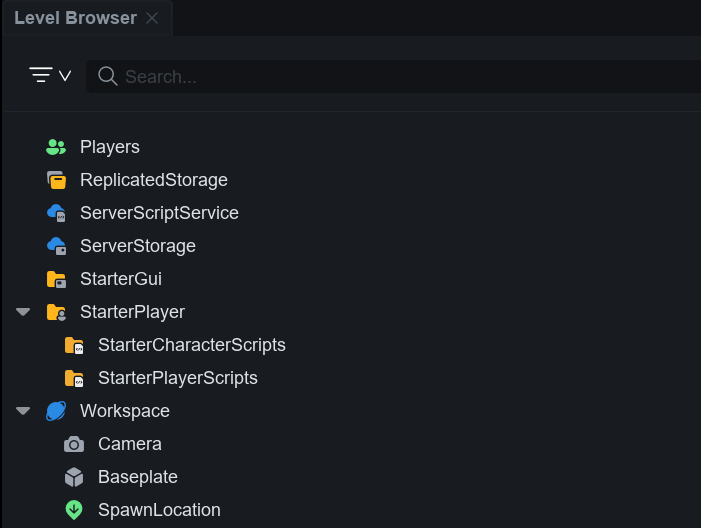
Scripts can be created in various locations such as Workspace or ReplicatedStorage from the **Level Browser**. Depending on the type of script and its placement, its purpose and execution availability can vary.

<div align="left"><figure><img src="https://2064130887-files.gitbook.io/~/files/v0/b/gitbook-x-prod.appspot.com/o/spaces%2FhrvYlLq1mQAq0V0vwPsb%2Fuploads%2Fgit-blob-0cc40955dec619d567247bc880aa7797807478ad%2Fimage.png?alt=media" alt=""><figcaption></figcaption></figure></div>

To efficiently manage the functions of scripts, each location is used for the following purposes:

<table><thead><tr><th width="227">Service Location</th><th width="309">Purpose</th><th>Executable Scripts</th></tr></thead><tbody><tr><td>ReplicatedStorage</td><td>Space for objects replicated between the <strong>server and client</strong><br>(Example: ModuleScript)</td><td>ModuleScript</td></tr><tr><td>ServerScriptService</td><td>Space for functionality related to the <strong>server</strong><br>(Example: ServerGameLogic)</td><td>Script<br>ModuleScript</td></tr><tr><td>ServerStorage</td><td>Space for <strong>server objects</strong> that do not need immediate replication<br>(Example: GunBullet)</td><td><p>Script</p><p>ModuleScript</p></td></tr><tr><td>StarterGui</td><td>Space for controlling GUI on the <strong>client</strong><br>(Example: PlayerHUD)</td><td>LocalScript<br>ModuleScript</td></tr><tr><td><p>StarterPlayer.</p><p>StarterCharacterScripts</p></td><td>Space for scripts that run on the <strong>client</strong> when the character spawns<br>(Example: FirstPersonView)</td><td>LocalScript<br>ModuleScript</td></tr><tr><td><p>StarterPlayer.</p><p>StarterPlayerScripts</p></td><td>Space for scripts that run on the <strong>client</strong> when the player enters<br>(Example: InputHandler)</td><td>LocalScript<br>ModuleScript</td></tr><tr><td>Workspace</td><td>Space for objects placed in the world (Example: CheckPoint)</td><td>Script<br>ModuleScript</td></tr></tbody></table>

## Execution Order

#### Script (Server) <a href="#script-server" id="script-server"></a>

When a player enters and the world is created, the server loads and executes Scripts placed in **ServerScriptService** and **Workspace**.

* **Execution order**: ServerScriptService ➡ Workspace
  * This order ensures that server scripts initialize first, and any global settings or object management tasks for the world are prioritized.

#### LocalScript (Client) <a href="#localscript-client" id="localscript-client"></a>

When a client connects to the world, it copies and loads the LocalScripts placed in **StarterGui**, **StarterPlayerScripts**, and **StarterCharacterScripts** to the client and then executes them.

* **Execution order** : StarterGui ➡ StarterPlayerScripts ➡ StarterCharacterScripts
  * This order initializes UI and player-related settings and logic, preparing the client for interaction with the game.

#### ModuleScript (Server or Client) <a href="#modulescript-server-or-client" id="modulescript-server-or-client"></a>

ModuleScripts can be called on both the server and the client, and are used to define common functionality or reusable code in **Scripts** or **LocalScripts**.

Modules are executed when they are called explicitly (`require`). The results are **cached** upon the first call, and subsequent calls return the same value, which enhances execution efficiency and ensures consistency.

* **Execution order (Server)** : Called location (e.g., Workspace, ServerStorage) ➡ ModuleScript location
  * A Script can call a ModuleScript that handles the global logic or server data of the game.
* **Execution order (Client)**: Called location (e.g., StarterPlayerScripts) ➡ ModuleScript location
  * A LocalScript can call a ModuleScript that handles UI or player-related functionality.

**💡 Tip.** If a ModuleScript is placed in ReplicatedStorage, it can be called by both the server and the client, making it useful for implementing common logic.

## Reference Materials

The script functions provided in OVERDARE Studio are all organized in the **API Reference**. If you are writing scripts and find yourself unsure about the usage or functionality of properties, functions, or events, the **API Reference** can help you quickly find the necessary information.

For example, if you are unsure about what the `PlayerAdded` event is and how it works in a script, you can check the API Reference to understand its role and how it operates. The API Reference includes descriptions, usage instructions, and related examples, making it a valuable tool for writing and debugging scripts.

Using the API Reference allows you to **write your code more accurately and efficiently**, and also gain a deeper understanding of the script functions.

{% content-ref url="../../../development/api-reference" %}
[api-reference](https://docs.overdare.com/development/api-reference)
{% endcontent-ref %}
