> For the complete documentation index, see [llms.txt](https://docs.overdare.com/llms.txt). Markdown versions of documentation pages are available by appending `.md` to page URLs; this page is available as [Markdown](https://docs.overdare.com/manual/script-manual/events-and-communication/bindableevent.md).

# Communication Within the Same Environment

## Overview <a href="#overview" id="overview"></a>

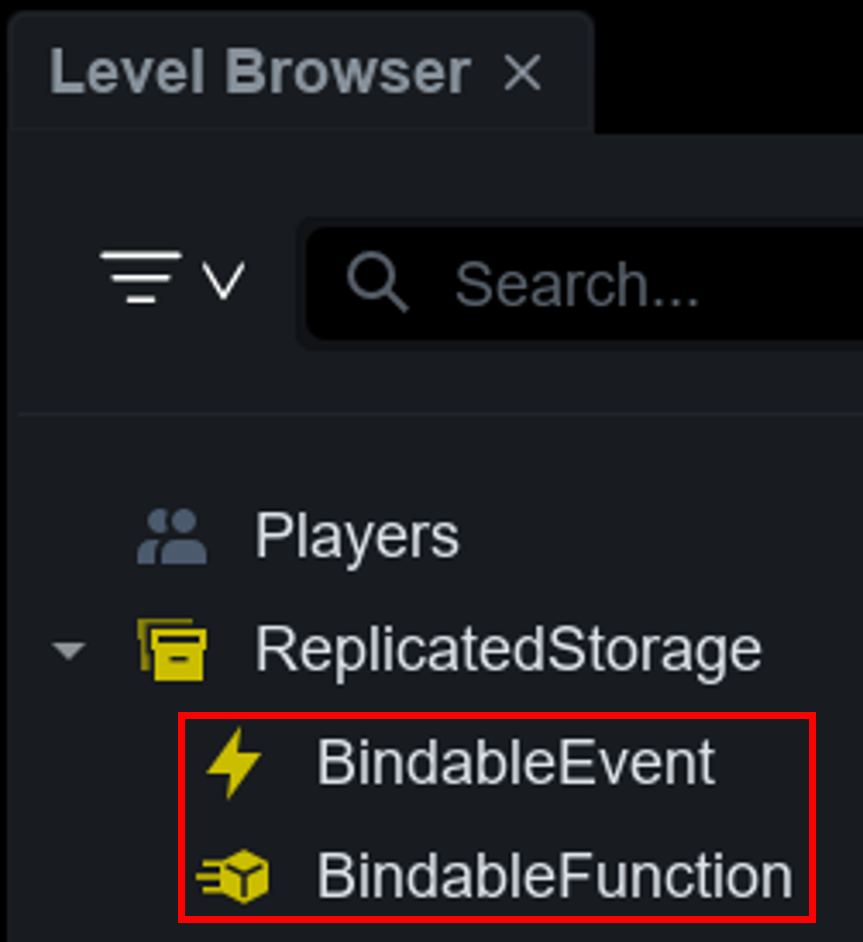
Use **BindableEvent** or **BindableFunction** to communicate between scripts that live in the same environment, such as between servers or between clients.

Use BindableEvent when you only need to send a notification and move on, and BindableFunction when you need the result of the work sent back to you.

Neither object can cross the client-server boundary. For communication that crosses it, use RemoteEvent or RemoteFunction.

## BindableEvent and BindableFunction Objects <a href="#bindableevent-and-bindablefunction-objects" id="bindableevent-and-bindablefunction-objects"></a>

**BindableEvent** is an object provided to handle events within the same environment, supporting **one-way communication**. The sending script keeps running without stopping.

**BindableFunction** is an object provided to handle requests and responses within the same environment, supporting **two-way communication**. The calling script **yields** until the assigned callback returns a value.

<img src="https://2064130887-files.gitbook.io/~/files/v0/b/gitbook-x-prod.appspot.com/o/spaces%2FhrvYlLq1mQAq0V0vwPsb%2Fuploads%2Fgit-blob-0697a2cd0485c2dcb4022a85e127e358a2163559%2Fbindable-placement.png?alt=media" alt="" width="300">

<table><thead><tr><th width="180">Item</th><th width="230">BindableEvent</th><th>BindableFunction</th></tr></thead><tbody><tr><td>Direction</td><td>One-way (notification)</td><td>Two-way (request and response)</td></tr><tr><td>Sender behavior</td><td>Keeps running without stopping</td><td>Waits until a value is returned</td></tr><tr><td>How to connect</td><td><code>Event:Connect(function)</code> — many can be connected</td><td><code>OnInvoke = function</code> — only one can be assigned</td></tr><tr><td>Return value</td><td>Cannot receive one</td><td>Receives multiple values as a <code>Tuple</code></td></tr><tr><td>Error on the receiving side</td><td>Does not affect other connected functions</td><td>Propagates to the caller</td></tr></tbody></table>

**Use BindableEvent for notifications that need no result.** A synchronous call stops the caller, so a long-running task also delays the rest of the game flow.

> 💡 Tip. To clearly distinguish whether the communication is between Server to Server or Client to Client, it is recommended to use **prefixes** such as **S2S\_** or **C2C\_** in the name. This makes the object’s role intuitive and improves code readability and maintainability.

![](https://2064130887-files.gitbook.io/~/files/v0/b/gitbook-x-prod.appspot.com/o/spaces%2FhrvYlLq1mQAq0V0vwPsb%2Fuploads%2Fgit-blob-ce9f632ec823f68fd578e4582862a57c414f3ed4%2Fbindable-naming.png?alt=media)

## Implementing Communication with BindableEvent <a href="#implementing-communication-with-bindableevent" id="implementing-communication-with-bindableevent"></a>

When firing an event with BindableEvent, you can send **arguments** along with it. These arguments are passed when calling the Fire method and can be received by the callback function on the receiving side.

### Server ➡ Server <a href="#server-server" id="server-server"></a>

**In Script1**

```lua
local ReplicatedStorage = game:GetService("ReplicatedStorage")
local S2S_SomeEvent = ReplicatedStorage:WaitForChild("S2S_SomeEvent")

local function TestFire()
    local SomeText = "BindableEvents"
    S2S_SomeEvent:Fire(SomeText) -- Passing arguments
end
```

**In Script2**

```lua
local ReplicatedStorage = game:GetService("ReplicatedStorage")
local S2S_SomeEvent = ReplicatedStorage:WaitForChild("S2S_SomeEvent")

local function OnSomeEvent(text)
    print("[SomeEvent]", "Parameter : ", text)
end
S2S_SomeEvent.Event:Connect(OnSomeEvent)
```

### Client ➡ Client <a href="#client-client" id="client-client"></a>

**In LocalScript1**

```lua
local ReplicatedStorage = game:GetService("ReplicatedStorage")
local C2C_SomeEvent = ReplicatedStorage:WaitForChild("C2C_SomeEvent")

local function TestFire()
    local SomeText = "BindableEvents"
    C2C_SomeEvent:Fire(SomeText) -- Passing arguments
end
```

**In LocalScript2**

```lua
local ReplicatedStorage = game:GetService("ReplicatedStorage")
local C2C_SomeEvent = ReplicatedStorage:WaitForChild("C2C_SomeEvent")

local function OnSomeEvent(text)
    print("[SomeEvent]", "Parameter : ", text)
end
C2C_SomeEvent.Event:Connect(OnSomeEvent)
```

## Implementing Communication with BindableFunction <a href="#implementing-communication-with-bindablefunction" id="implementing-communication-with-bindablefunction"></a>

The handling script **assigns** a callback to `OnInvoke`, and the calling script calls it with the `Invoke` method. Arguments passed to `Invoke` arrive at the callback as-is, and whatever the callback returns goes back to the caller.

### Server ➡ Server <a href="#server-server-1" id="server-server-1"></a>

**In Script1 (handling side)**

```lua
local ReplicatedStorage = game:GetService("ReplicatedStorage")
local S2S_GetPlayerScore = ReplicatedStorage:WaitForChild("S2S_GetPlayerScore")

local ScoreTable = {}

local function OnGetPlayerScore(userId)
    local score = ScoreTable[userId] or 0
    return score, score >= 100 -- Returning multiple values at once
end
S2S_GetPlayerScore.OnInvoke = OnGetPlayerScore -- Assign the function instead of using Connect
```

**In Script2 (calling side)**

```lua
local ReplicatedStorage = game:GetService("ReplicatedStorage")
local S2S_GetPlayerScore = ReplicatedStorage:WaitForChild("S2S_GetPlayerScore")

local function PrintScore(player)
    -- Waits on this line until the value is returned
    local score, isTop = S2S_GetPlayerScore:Invoke(player.UserId) -- Passing arguments
    print("[GetPlayerScore]", player.Name, " / score : ", score, " / isTop : ", isTop)
end
```

### Client ➡ Client <a href="#client-client-1" id="client-client-1"></a>

**In LocalScript1 (handling side)**

```lua
local ReplicatedStorage = game:GetService("ReplicatedStorage")
local C2C_GetSelectedSlot = ReplicatedStorage:WaitForChild("C2C_GetSelectedSlot")

local SelectedSlot = 1

local function OnGetSelectedSlot()
    return SelectedSlot
end
C2C_GetSelectedSlot.OnInvoke = OnGetSelectedSlot
```

**In LocalScript2 (calling side)**

```lua
local ReplicatedStorage = game:GetService("ReplicatedStorage")
local C2C_GetSelectedSlot = ReplicatedStorage:WaitForChild("C2C_GetSelectedSlot")

local function UseCurrentSlot()
    local slot = C2C_GetSelectedSlot:Invoke()
    print("[GetSelectedSlot]", "Slot : ", slot)
end
```

### Callback Rules for OnInvoke <a href="#callback-rules-for-oninvoke" id="callback-rules-for-oninvoke"></a>

`OnInvoke` is not an event but a **property that holds a function**. It works differently from `Event`, so keep these three points in mind.

* **You cannot use `:Connect()`.** Assign it as `OnInvoke = function`.
* **Only one function is kept.** If you assign more than once, only the last assigned function runs.
* **If you omit `return`, the caller receives `nil`.** Using that value directly can cause an error later in the code.

```lua
local ReplicatedStorage = game:GetService("ReplicatedStorage")
local S2S_SomeFunction = ReplicatedStorage:WaitForChild("S2S_SomeFunction")

S2S_SomeFunction.OnInvoke:Connect(SomeFunction) -- Not possible. OnInvoke is not an event
S2S_SomeFunction.OnInvoke = SomeFunction        -- Correct usage
```

Overlapping calls each run the callback separately. If you replace `OnInvoke` while a call is in progress, **that call finishes with the previous function**, and only new calls made afterward use the new one.

## Important Notes <a href="#important-notes" id="important-notes"></a>

### The Call Never Resumes Without a Callback <a href="#the-call-never-resumes-without-a-callback" id="the-call-never-resumes-without-a-callback"></a>

If you call a BindableFunction whose `OnInvoke` has not been assigned, **the calling thread stops forever with no error and no timeout.** There is no way to cancel the wait.

* Design your initialization order so the callback is assigned before any call is made.
* If the work can take a long time, consider sending the request with a BindableEvent and reporting the result through a separate event when it finishes.

**You can tell a hang and an error apart by the symptom.** Assigning a value that is not a function (a module table, for example) to `OnInvoke` **passes silently**, and the error appears the moment you call it. In other words, if nothing happens at all, the callback is **not assigned**; if an error appears right at the call, a **non-function value was assigned**.

BindableEvent has no such hang. Even with no connected function, the script that called `Fire` keeps running.

### Callback Errors Propagate to the Caller <a href="#callback-errors-propagate-to-the-caller" id="callback-errors-propagate-to-the-caller"></a>

An error raised in a BindableFunction callback is delivered to the caller and interrupts the calling code. If the work can fail, wrap the call in `pcall()` or return a success flag instead of raising an error.

```lua
-- How to catch the error
local isSuccess, result = pcall(function()
    return S2S_GetPlayerScore:Invoke(userId)
end)

-- How to return a result instead of raising an error (recommended)
local function OnGetPlayerScore(userId)
    if typeof(userId) ~= "number" then
        return false, "invalid userId"
    end
    return true, ScoreTable[userId] or 0
end
```

BindableEvent runs each connected function on its own thread, so an error in one of them affects neither the others nor the sender.

### Table Arguments Are Copies <a href="#table-arguments-are-copies" id="table-arguments-are-copies"></a>

Both objects **copy** the table you pass before handing it to the receiving side. Filling an argument table on the receiving side leaves the sender’s original empty, so you must **receive what you need as a return value.** Metatables are not delivered, so you cannot pass an object with methods as-is.

```lua
local Box = {}

-- This does not work
BindableFunction.OnInvoke = function(t) t.result = 42 end
BindableFunction:Invoke(Box)
print(Box.result) --> nil (the callback filled in a copy)

-- The correct way
BindableFunction.OnInvoke = function(t) t.result = 42 return t end
local Result = BindableFunction:Invoke(Box)
print(Result.result) --> 42
```

When passing a table, **use string keys only.** If a table holds both array elements and named fields, the named fields disappear, and instances or functions used as keys turn into strings that can no longer be looked up with the original key. **No error or warning is raised** during this process.

```lua
-- Risky — owner and level disappear
BindableFunction:Invoke({ "Sword", "Bow", owner = "Diva", level = 7 })

-- Safe — nest the array one level in
BindableFunction:Invoke({ items = { "Sword", "Bow" }, owner = "Diva", level = 7 })
```

## Advanced Usage <a href="#advanced-usage" id="advanced-usage"></a>

* For communication that needs no return value, use **BindableEvent** so the caller does not stop.
* If you only need to share values or functions, a **ModuleScript** is simpler and faster. Use the Bindable objects when you need to keep scripts loosely coupled.
* Do not perform long waits inside a callback (`task.wait`, external communication, and so on). The caller waits just as long.
* When using a single object to handle several kinds of requests, add a first argument that indicates the **request type**.
* Clients of different players cannot communicate through these objects. In that case, use RemoteEvent or RemoteFunction, which go through the server.
