# World Product Sales

## Overview

Creators can use the Marketplace to **sell** world products like **in-game currency** (Gold, Crystals, etc.) or **items** (guns, ammo, healing potions, etc.) to players.

## Seller Responsibilities

Creators are **responsible for ensuring proper delivery** of purchased items to buyers. In cases where missing deliveries, misleading product descriptions, damage to the value of purchased items, or other **issues arise**, creators must **take appropriate action** to resolve them. Creators who fail to fulfill delivery obligations or repeatedly receive related reports may be subject to **penalties**, such as payout holds, world sanctions, or even account deactivation.

Learn More

{% content-ref url="../../overdare/policy/world-product-guidelines" %}
[world-product-guidelines](https://docs.overdare.com/overdare/policy/world-product-guidelines)
{% endcontent-ref %}

### Point of Contact Setting

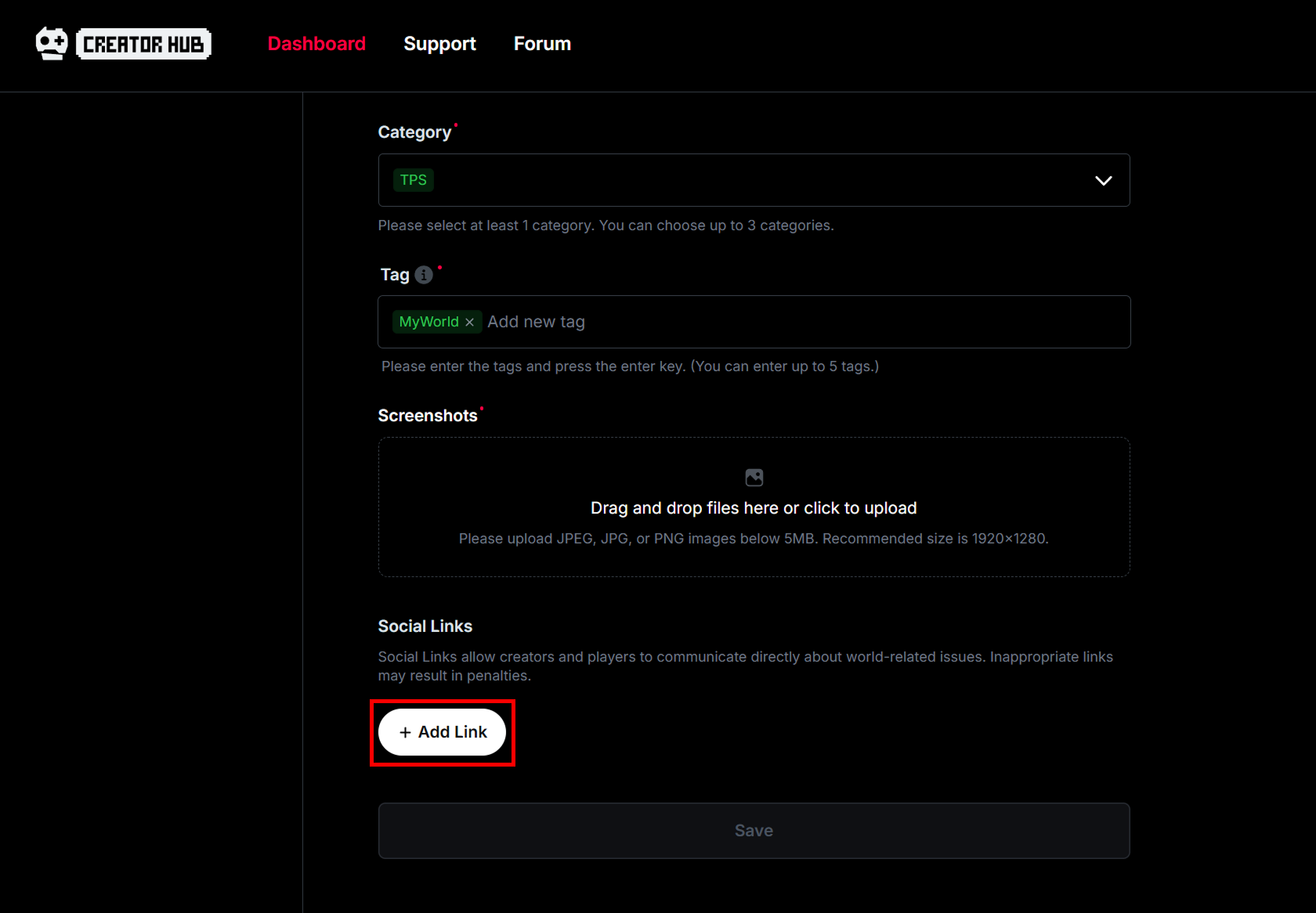
A **social link must be set** for any worlds that incorporate the element of in-game purchases so that creators can engage directly with players to address product-related inquiries.

**Worlds without a social link cannot list products for sale.**

<figure><img src="https://2064130887-files.gitbook.io/~/files/v0/b/gitbook-x-prod.appspot.com/o/spaces%2FhrvYlLq1mQAq0V0vwPsb%2Fuploads%2Fgit-blob-68dd9f2fafe53df9601a5b5637c15a1d3586da0a%2FMarketplace-SocialLink.png?alt=media" alt=""><figcaption></figcaption></figure>

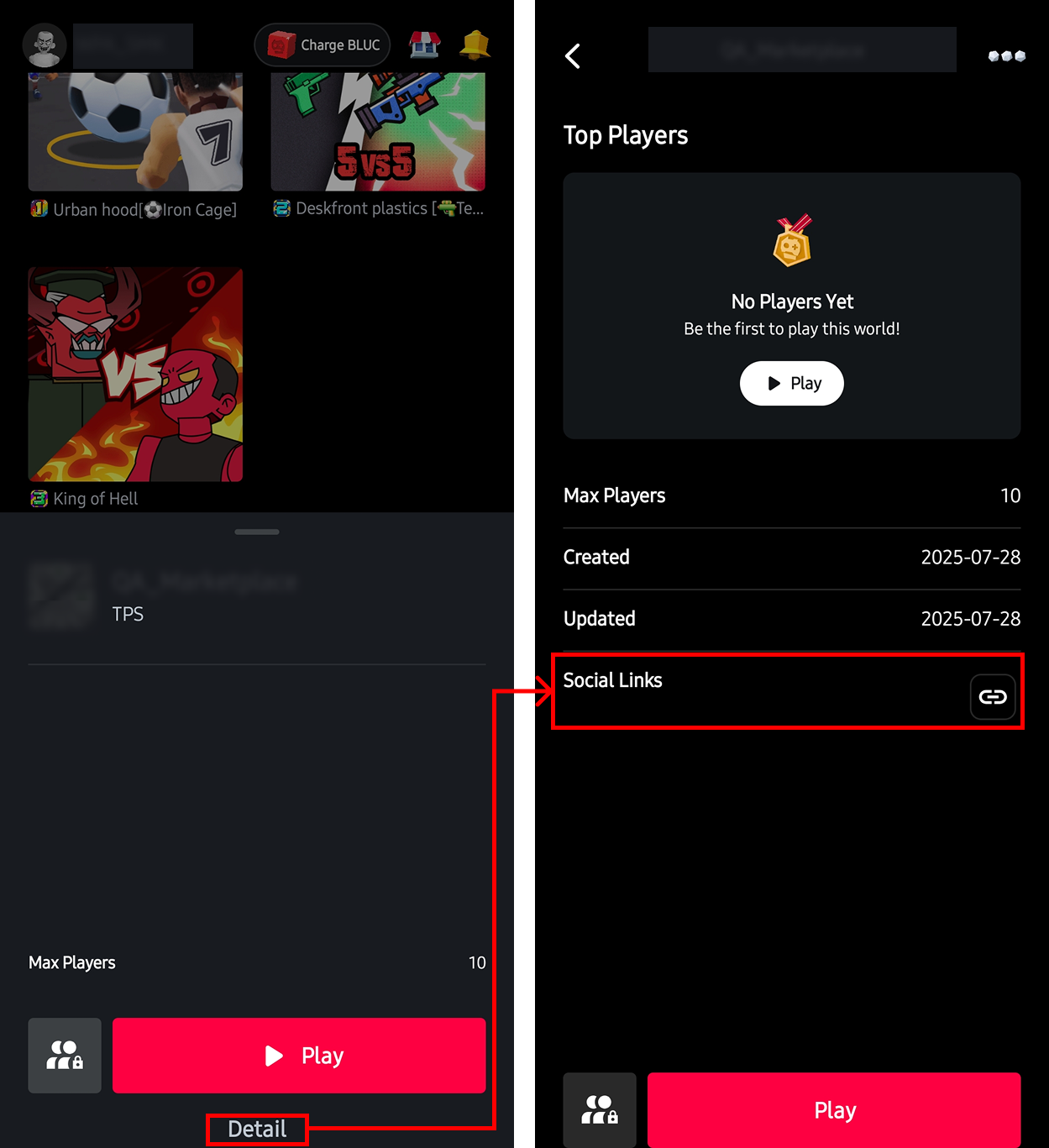
To see a registered social link, go to the OVERDARE App, click a world, and then press the **Detail button** in the popup displayed.

<figure><img src="https://2064130887-files.gitbook.io/~/files/v0/b/gitbook-x-prod.appspot.com/o/spaces%2FhrvYlLq1mQAq0V0vwPsb%2Fuploads%2Fgit-blob-96963badad791d785e7dcfa1c4197015f593e2b7%2FMarketplace-SocialLink2_new2.png?alt=media" alt=""><figcaption></figcaption></figure>

## Item Type

<table><thead><tr><th width="152.33331298828125">Item Type</th><th>Purpose</th><th>Example</th></tr></thead><tbody><tr><td>World Product</td><td>One-time delivery of currency, items, etc.</td><td>Currency (Gold, Crystals, etc.)<br>Items (swords, axes, healing potions, etc.)<br>Consumables (Revives, Instant Building Passes, etc.)</td></tr></tbody></table>

## Manage Products

Products are set up per world and can be configured individually.

To register and manage products, you must first **publish your world**. If you assign a group as the Owner group when publishing the world, you can manage products and share revenue with group members.

### Features by Permission Level

<table><thead><tr><th width="274">Permission Level</th><th width="150.333251953125">View/Register Product</th><th width="162.0001220703125">Edit Product</th><th>Share Revenue</th></tr></thead><tbody><tr><td>World Creator (Personal World)</td><td>O</td><td>O</td><td>O</td></tr><tr><td>Group Owner (Group World)</td><td>O</td><td>O</td><td>O</td></tr><tr><td>Group Member (Group World)</td><td>O</td><td>X</td><td>X</td></tr></tbody></table>

### View Product List

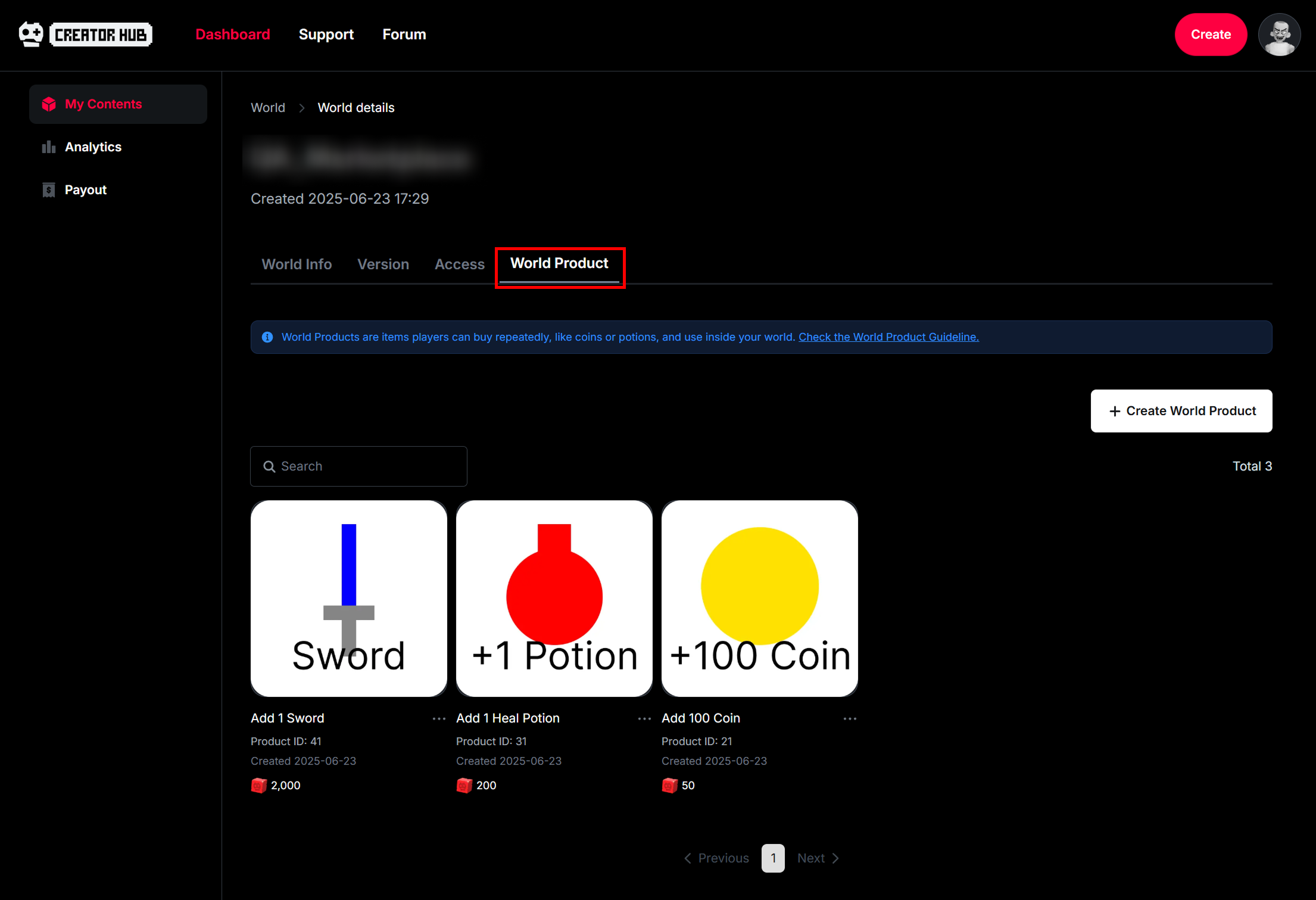
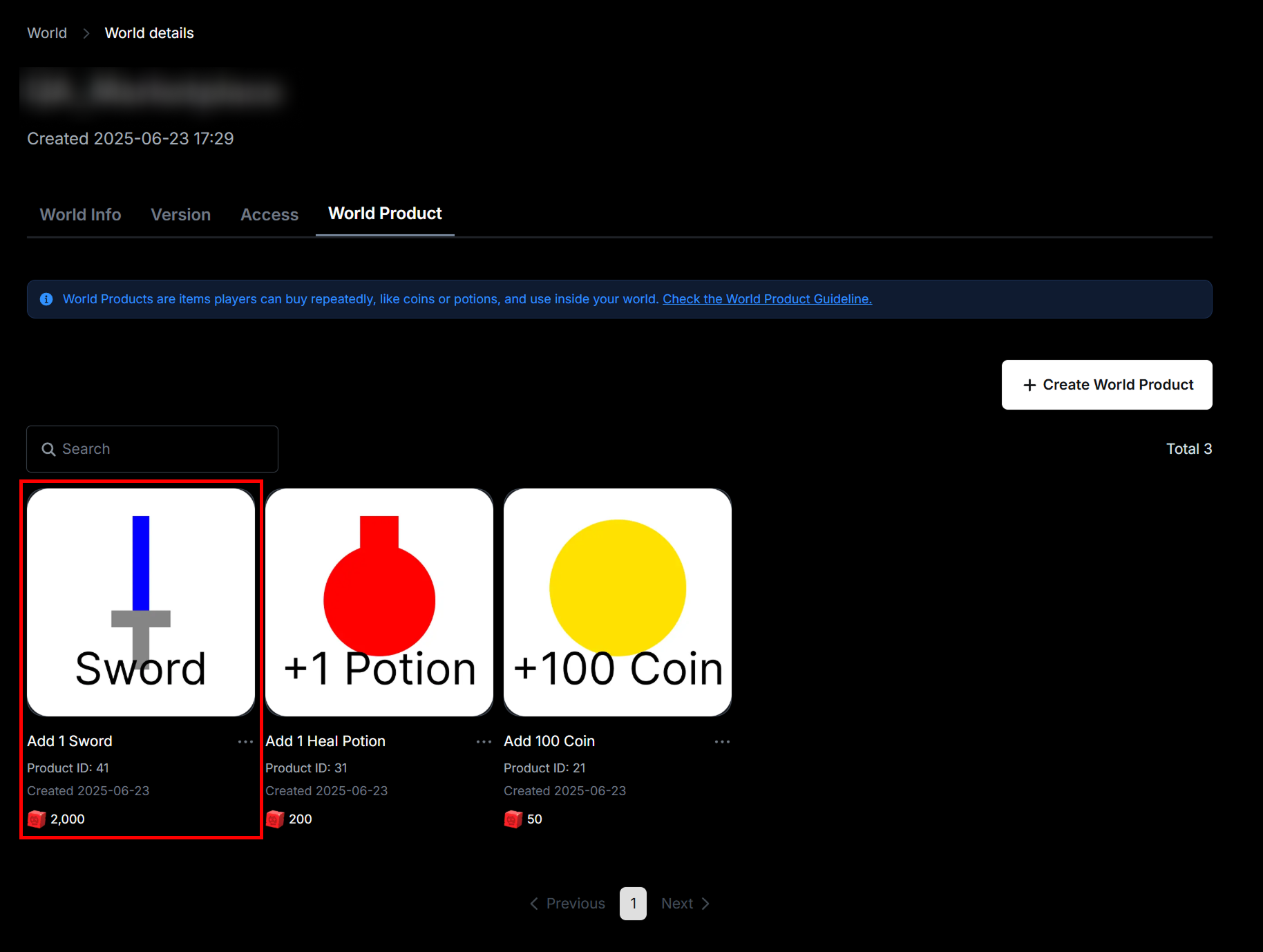
From the World tab on the Dashboard, click on your world. On the world's page, click the **World Product** tab to view your registered products.

<figure><img src="https://2064130887-files.gitbook.io/~/files/v0/b/gitbook-x-prod.appspot.com/o/spaces%2FhrvYlLq1mQAq0V0vwPsb%2Fuploads%2Fgit-blob-45bab3cc44abbea3005dd35acd3c2d26d6400f1c%2FMarketplace_01.png?alt=media" alt=""><figcaption></figcaption></figure>

### Register Product

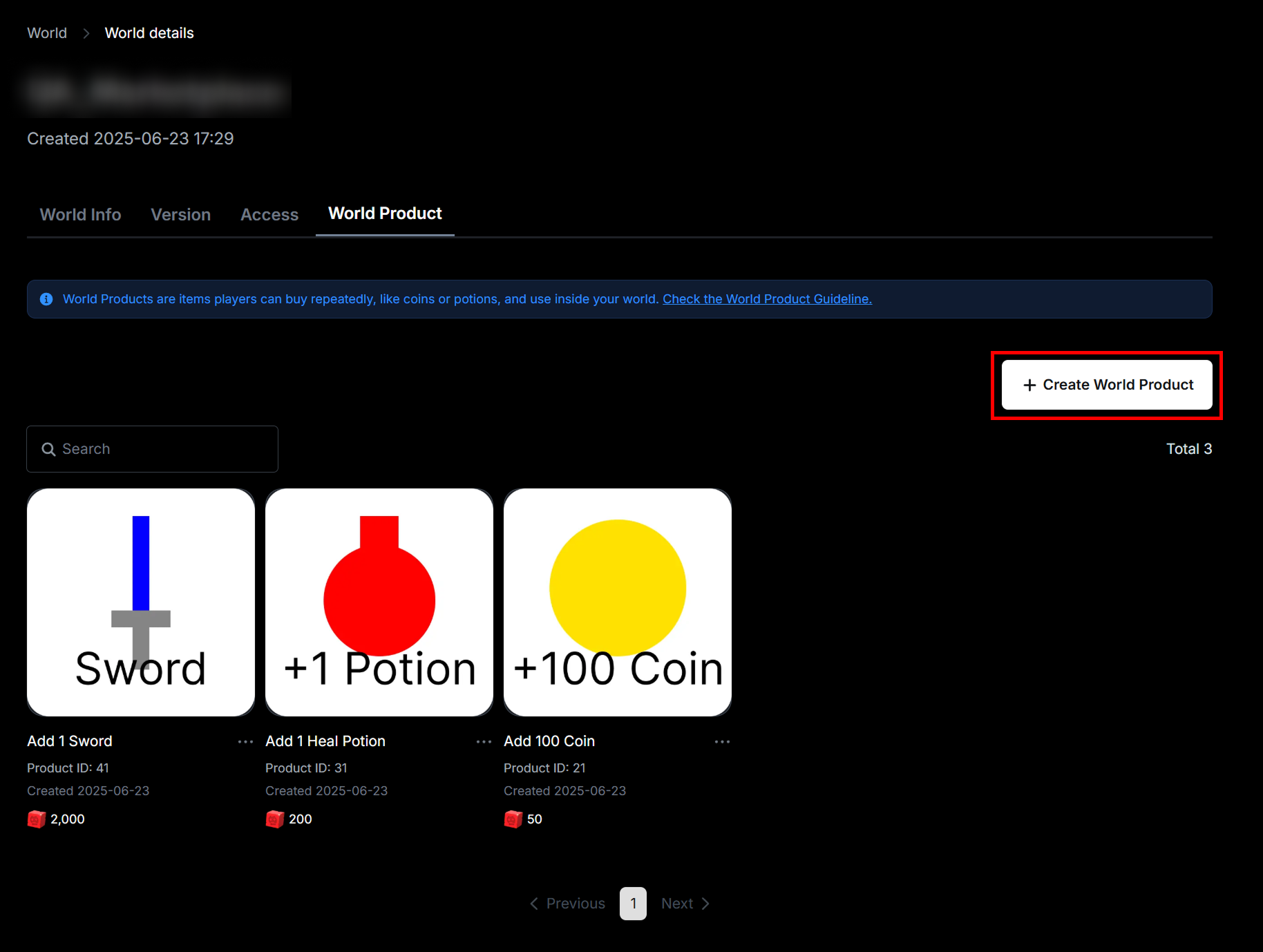
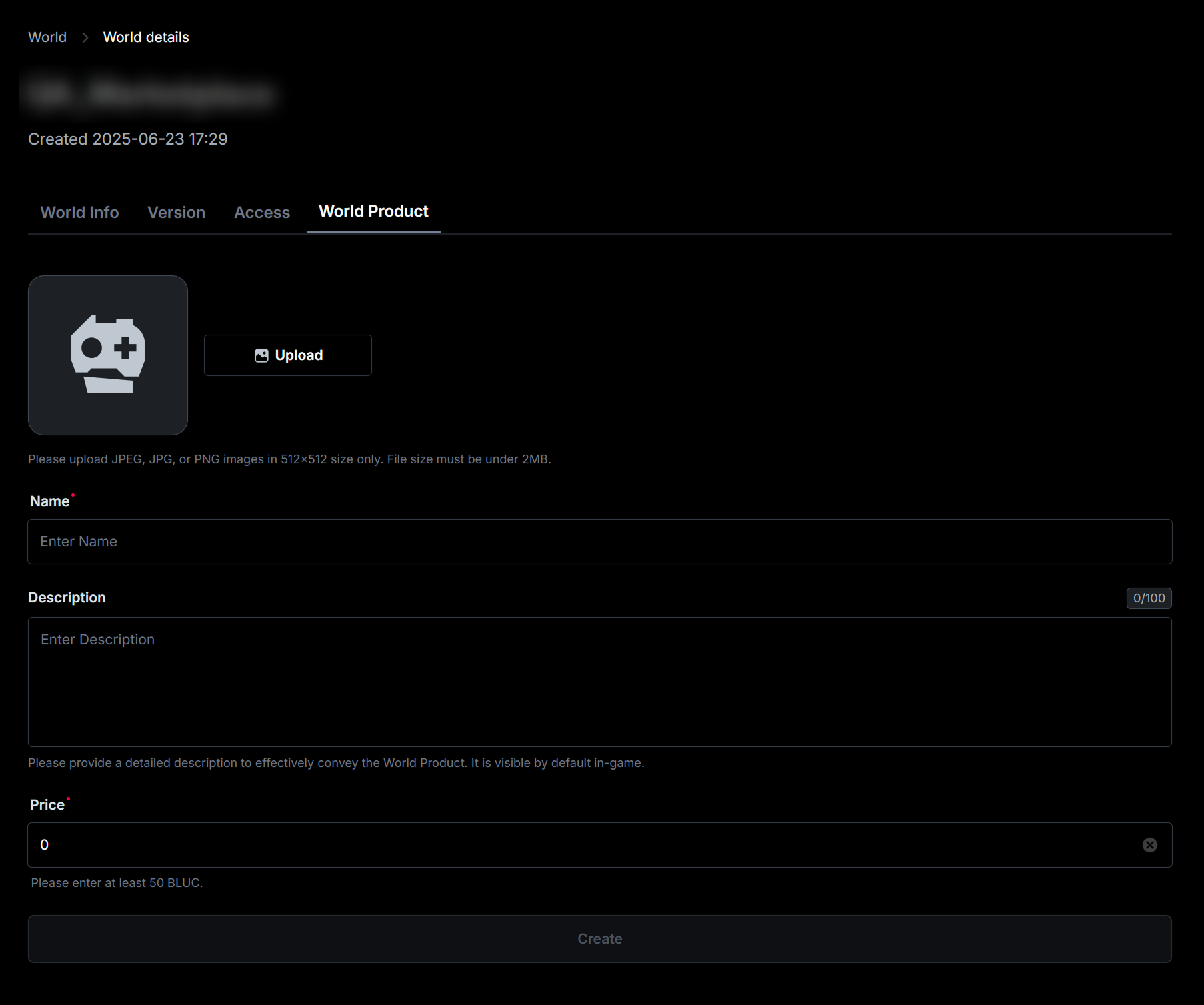
Click the **+ Create World Product button** to add a new product.

<figure><img src="https://2064130887-files.gitbook.io/~/files/v0/b/gitbook-x-prod.appspot.com/o/spaces%2FhrvYlLq1mQAq0V0vwPsb%2Fuploads%2Fgit-blob-cf5788cca5bee422a8ace01c4b14d2ae76c301f6%2FMarketplace_02.png?alt=media" alt=""><figcaption></figcaption></figure>

<figure><img src="https://2064130887-files.gitbook.io/~/files/v0/b/gitbook-x-prod.appspot.com/o/spaces%2FhrvYlLq1mQAq0V0vwPsb%2Fuploads%2Fgit-blob-f338933e2680df72f8a46bd5e7ab7ab1d9266335%2FMarketplace_04.png?alt=media" alt=""><figcaption></figcaption></figure>

### Copy Product ID

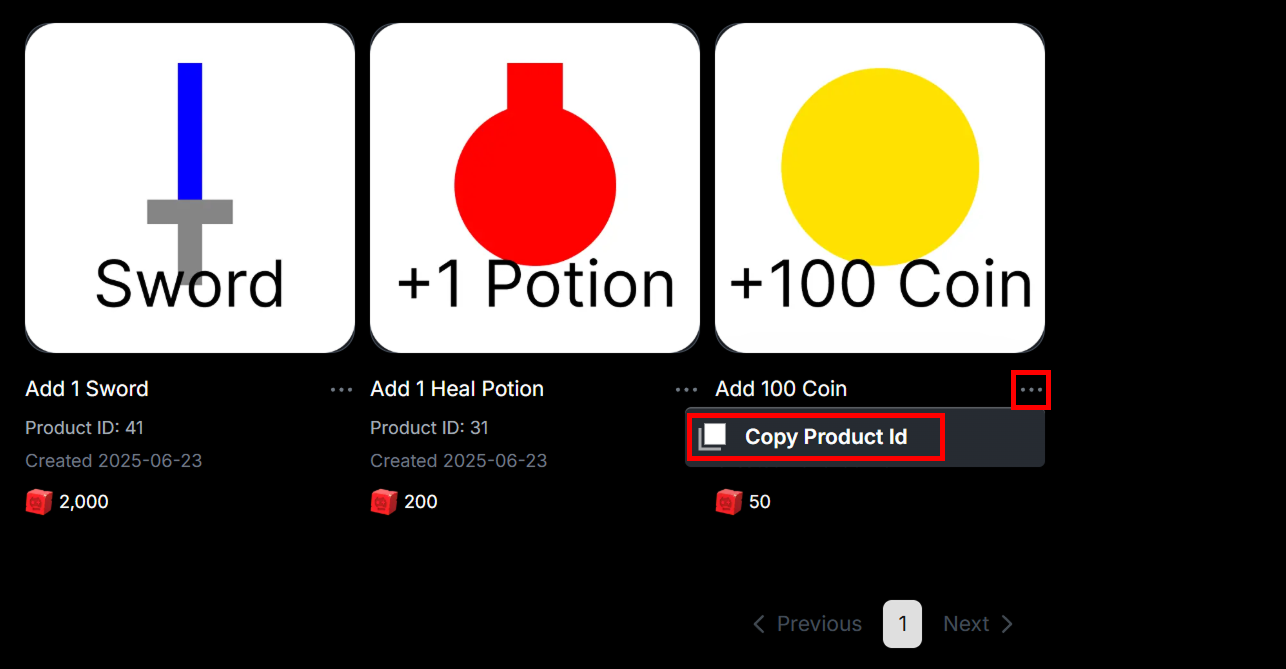
Click the **... button** next to each product's name, then click **Copy Product ID** to copy the product's ID.

<figure><img src="https://2064130887-files.gitbook.io/~/files/v0/b/gitbook-x-prod.appspot.com/o/spaces%2FhrvYlLq1mQAq0V0vwPsb%2Fuploads%2Fgit-blob-70d6edd84aa26a6a54262202e0c1d2e1efefd296%2FMarketplace_03.png?alt=media" alt=""><figcaption></figcaption></figure>

### Edit Product

Click the product image or name to change its image, name, or price.

<figure><img src="https://2064130887-files.gitbook.io/~/files/v0/b/gitbook-x-prod.appspot.com/o/spaces%2FhrvYlLq1mQAq0V0vwPsb%2Fuploads%2Fgit-blob-b78644329017acc8f51fde0ccef17282b8f09a9f%2FMarketplace_05.png?alt=media" alt=""><figcaption></figcaption></figure>

{% hint style="warning" %}
If a product is edited **while the purchase window is already open** for a user, the transaction will be processed with the **previous information (price)**.
{% endhint %}

## Scripting for Product Sales

Since purchasing products through the Marketplace involves **spending user currency**, it is essential to implement **strict error handling and debugging** using methods like pcall. This helps maintain **system stability during runtime errors or network delays,** and **prevents critical issues** such as missing item deliveries.

### Feature List

<table><thead><tr><th width="348.3333740234375">Feature</th><th>Description</th></tr></thead><tbody><tr><td>GetProductInfo(productId, productType)</td><td>Request information on a specific product</td></tr><tr><td>GetWorldProductsAsync()</td><td>Request information on all world products</td></tr><tr><td>PromptProductPurchase(player, productId)</td><td>Request purchase</td></tr><tr><td>PromptProductPurchaseFinished</td><td>Handle the event required when the purchase window closes</td></tr><tr><td>ProcessReceipt</td><td>Event for <strong>updating the receipt status to Completed</strong> after successful delivery of the purchased product</td></tr></tbody></table>

### Request Information on a Specific Product (GetProductInfo)

Returns the product information corresponding to the product ID (productId) and product type (Enum.InfoType).

```lua
local MarketplaceService = game:GetService("MarketplaceService")

local function Request_GetProductInfo(productId)
    local success, errorOrProductInfo = pcall(function()
        return MarketplaceService:GetProductInfo(productId, Enum.InfoType.Product)
    end)
    
    if not success then
        print("Error: " .. errorOrProductInfo .. " / ProductId : " .. productId)
        
    else
        local productInfo = errorOrProductInfo 
        print("World Product Name: " .. tostring(productInfo.Name))
        print("ProductId: " .. tostring(productInfo.ProductId))
        print("ProductType: " .. tostring(productInfo.ProductType))
        print("PriceInBLUC: " .. tostring(productInfo.PriceInBLUC))
        print("Description: " .. tostring(productInfo.Description))
        print("Created: " .. productInfo.Created)
        print("Updated: " .. productInfo.Updated)
        
        -- Display on UI
    end
end
```

### Request Information on All World Products (GetWorldProductsAsync)

Returns a Pages Object containing information on all world products.

```lua
local MarketplaceService = game:GetService("MarketplaceService")

local function Request_GetWorldProductsAsync()
    local success, errorOrWorldProducts = pcall(function()
        return MarketplaceService:GetWorldProductsAsync()
    end) 
    
    if not success then
        print("Error: " .. errorOrWorldProducts)
        
    else
        local worldProducts = errorOrWorldProducts
        
        local pageCount = 1	  
        local dataList = {}
			
        while true do
            local currentPage = worldProducts:GetCurrentPage()	
		    
            -- Exit loop if it's the last page
            if worldProducts.IsFinished or currentPage == nil then           	
                print(pageCount .. " page IsFinished : " .. tostring(worldProducts.IsFinished))
                break
            else
                worldProducts:AdvanceToNextPageAsync()
                pageCount = pageCount + 1
            end
	    
            -- Each page contains up to 100 product entries
            for _, productInfo in pairs(currentPage) do		
                local i = #dataList + 1
				
                print("------ " .. i .. " ------")
                print("World Product Name: " .. tostring(productInfo.Name))
                print("ProductId: " .. tostring(productInfo.ProductId))
                
                print("ProductType: " .. tostring(productInfo.ProductType))
                print("PriceInBLUC: " .. tostring(productInfo.PriceInBLUC))
                print("Description: " .. tostring(productInfo.Description))
                print("Created: " .. productInfo.Created)
                print("Updated: " .. productInfo.Updated)
	
                table.insert(dataList, productInfo)
		
                -- Display on UI 
            end
        end
    end
end
```

### Request Purchase (PromptProductPurchase)

Request the purchase of the product corresponding to the product ID (productID).\
(Purchase window appears using the system UI.)

```lua
local MarketplaceService = game:GetService("MarketplaceService")

local function Request_PromptProductPurchase(player, productId)
    local success, error = pcall(function()
        MarketplaceService:PromptProductPurchase(player, productId)
    end)
	
    if not success then
        print("Error: " .. error .. " / ProductId : " .. productId)        
    end	
end
```

### When the Purchase Window Closes (PromptProductPurchaseFinished)

This event is triggered when the purchase window, opened via request Purchase (PromptProductPurchase), is closed. If the purchase is successful, "true" will be sent to isPurchased; if the user cancels or the purchase fails, "false" will be sent to isPurchased.

This event should only be used to detect whether the purchase window is closed. <mark style="color:red;">**It must never be used to process the deliver of purchased products.**</mark>

```lua
local Players = game:GetService("Players")
local MarketplaceService = game:GetService("MarketplaceService")

local function OnPromptPurchaseFinished(userId, productId, isPurchased)
    local player = Players:GetPlayerByUserId(userId)
    
    print(player.Name .. " / ProductID : " .. productId .. " / isPurchased : " .. tostring(isPurchased))
end
MarketplaceService.PromptProductPurchaseFinished:Connect(OnPromptPurchaseFinished)
```

### Product Delivery on Successful Purchase (ProcessReceipt)

Trigger the event that returns **undelivered receipt** information from successfully purchased products.

#### Receipt Status

<table><thead><tr><th width="175.6666259765625">Status</th><th width="193.3333740234375">Description</th><th>Re-trigger Eligibility</th></tr></thead><tbody><tr><td>NotProcessedYet</td><td>Product <strong>Undelivered</strong></td><td><strong>May be triggered again</strong> depending on trigger conditions</td></tr><tr><td>PurchaseGranted</td><td>Product <strong>Delivered</strong></td><td>Not triggered again</td></tr></tbody></table>

#### Trigger Conditions

* When a world product is successfully purchased (the successful purchase popup is shown to the user),
  * if there are any undelivered products, **those previous pending items will also be triggered together** when the new purchase is made.
* When the user **connects (or reconnects)** to the server

#### How to Update Delivery Status

* After successfully delivering the product, return Enum.ProductPurchaseDecision.**PurchaseGranted.**

#### Important Notes

* The ProcessReceipt event should be connected **only once in a server-side script**.
* This callback **can yield** indefinitely and remains valid until it receives a response, as long as the server is running.
* If there are multiple undelivered receipts, **each one will be triggered individually**, and the order of these callbacks is non-deterministic.
* The callback will only be triggered when the user is **present on the server**.
  * However, the result of the callback may still be recorded on the backend even if the user is no longer on the server.
* Returning **PurchaseGranted** from the callback does not guarantee that the backend will successfully record it. In such cases, the receipt status remains unchanged (remains undelivered).
* Products in an **undelivered state** will have their funds held in an **Escrow** state.

```lua
local Players = game:GetService("Players")
local MarketplaceService = game:GetService("MarketplaceService")

local ProductDeliverer = {}

-----------------------------------------------------------------------------
-- You can define a function for each product ID in a table as shown below to 
-- implement custom delivery logic for each product.
ProductDeliverer[Enter the product number here.] = function(player)
    local success, resultOrError = pcall(function()
        -- Deliver the product to the player and handle saving using DataStore
        
        -- Tip.
        -- When saving product information using DataStore
        -- it's recommended to use IncrementAsync or UpdateAsync
        -- to prevent network conflicts or race conditions.
                
        -- Return "true" when the product has been successfully delivered and saved
        return true
    end)
    
    if success and resultOrError then
        return true
        
    else
        return false, resultOrError
    end
end

-----------------------------------------------------------------------------
-- Callback for handling the receipt triggered after a successful product purchase
local function OnProcessReceipt(receiptInfo)	
    -- Receipt information
    local success, error = pcall(function()	
        print("PurchaseId: " .. receiptInfo.PurchaseId)
        print("UserId: " .. receiptInfo.PlayerId)
        print("ProductId: " .. receiptInfo.ProductId)
        print("CurrencySpent: " .. receiptInfo.CurrencySpent)
        print("PurchaseDateTime: " .. receiptInfo.PurchaseDateTime)
    end)
    
    if not success then
        print("Error: " .. tostring(error))
        return Enum.ProductPurchaseDecision.NotProcessedYet
    end
    
    -- If the player is valid 
    local productId = receiptInfo.ProductId        
    local userId = receiptInfo.PlayerId
    
    local player = Players:GetPlayerByUserId(userId)  
    if player == nil then
        print("Error: player is nil")
        return Enum.ProductPurchaseDecision.NotProcessedYet	
    end  
    
    -- Trigger the product delivery function
    local delivererFunc = ProductDeliverer[productId]
    local success, error = delivererFunc(player)
    
    -- If the product is successfully delivered
    if success then
        -- Return the status as delivered
        print("Item delivery successful / ProductId : " .. productId)
        return Enum.ProductPurchaseDecision.PurchaseGranted
        
    -- If product delivery fails
    else
        print("Error: " .. tostring(error))
        return Enum.ProductPurchaseDecision.NotProcessedYet
    end
end
MarketplaceService.ProcessReceipt = OnProcessReceipt
```

## Test Purchase

You can test product purchases and delivery in Studio's playtest environment.\
(Currency will not be deducted.)

## Revenue Analytics

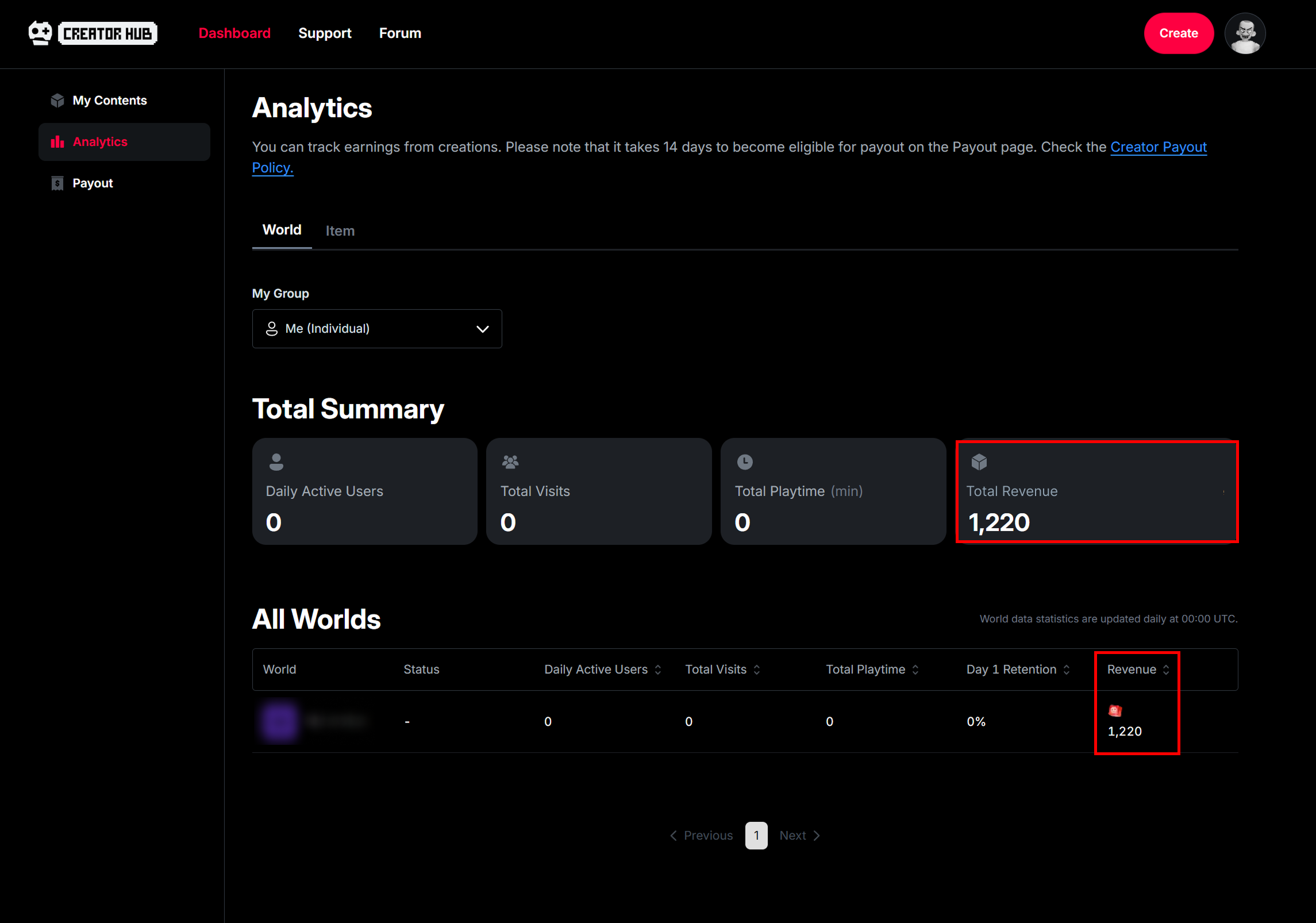
Revenue analytics are updated daily at **00:00 UTC**, and **Total Revenue** and **Revenue by World (Revenue column)** can be viewed in the Dashboard’s Analytics tab.

<figure><img src="https://2064130887-files.gitbook.io/~/files/v0/b/gitbook-x-prod.appspot.com/o/spaces%2FhrvYlLq1mQAq0V0vwPsb%2Fuploads%2Fgit-blob-feb381fbe65b7f764d12e12b7f756ad0b594f9cb%2FMarketplace-Analytics-01.png?alt=media" alt=""><figcaption></figcaption></figure>

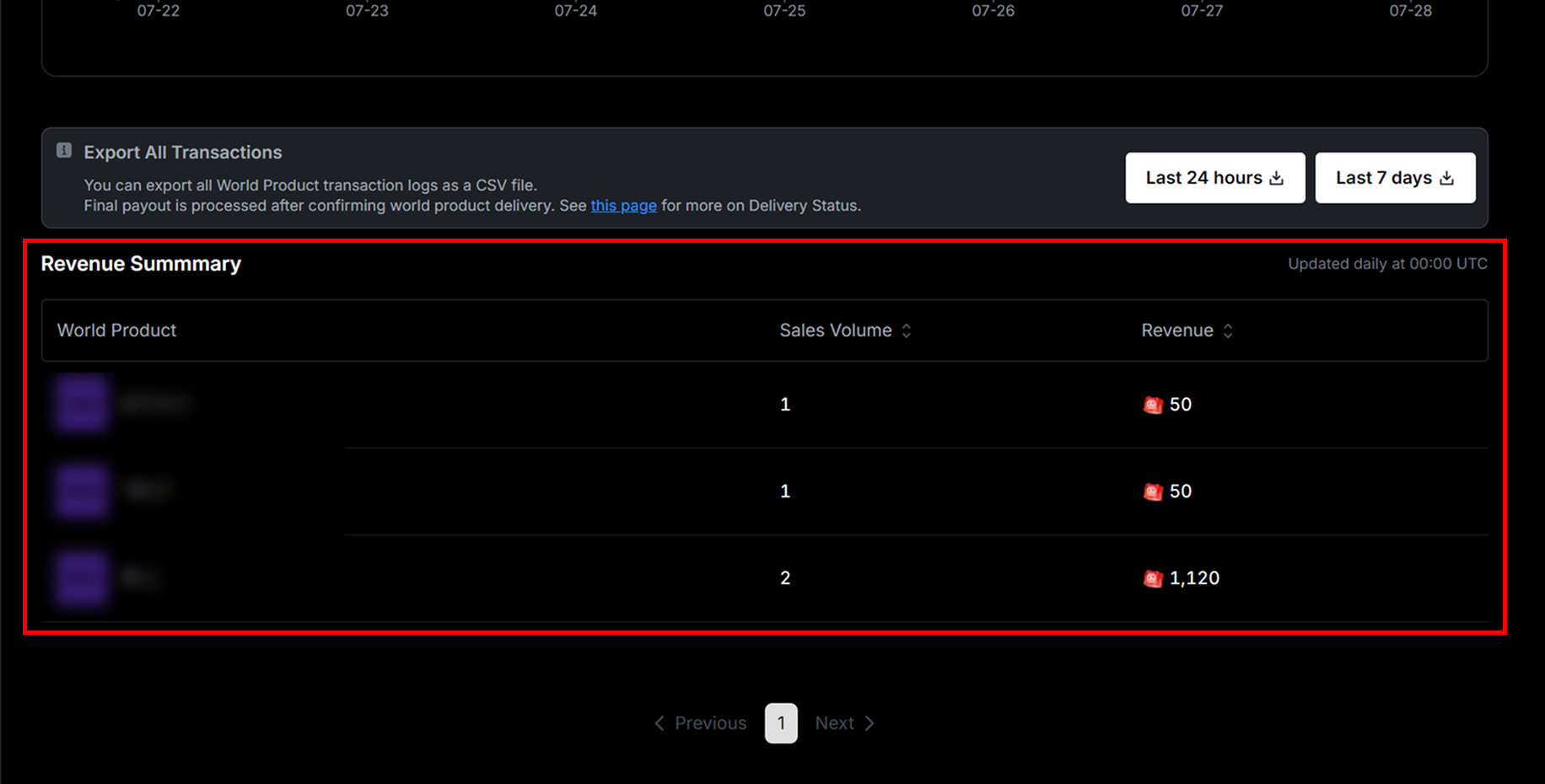
Click the world name to go to the **Analytics Overview page**, where the **Revenue Summary section** at the page’s footer displays sales revenue by product.

<figure><img src="https://2064130887-files.gitbook.io/~/files/v0/b/gitbook-x-prod.appspot.com/o/spaces%2FhrvYlLq1mQAq0V0vwPsb%2Fuploads%2Fgit-blob-0d22a54eba9a7d2d34361b1835037ddb6554f2cc%2FMarketplace-Analytics-02.png?alt=media" alt=""><figcaption></figcaption></figure>

### Review of Receipt Information including Payment Status

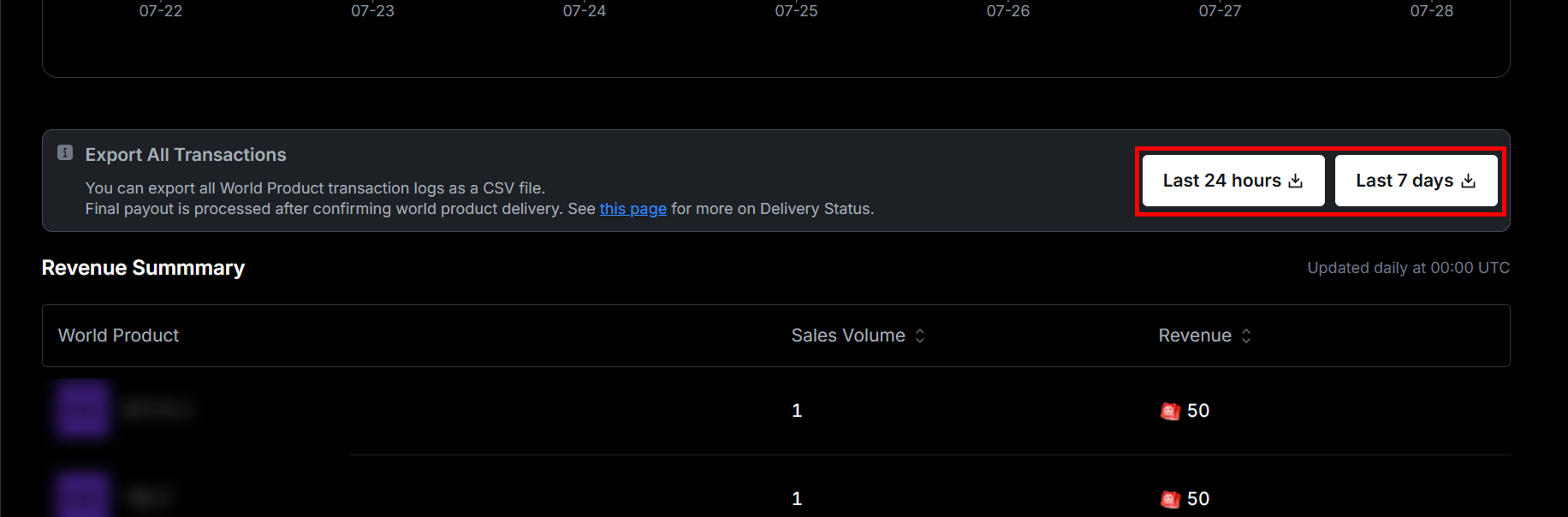
Select the designated button in the **Export All Transactions section** to export **receipt details**—including payment status, sale date, purchaser, and Account ID—in a CSV file.

<figure><img src="https://2064130887-files.gitbook.io/~/files/v0/b/gitbook-x-prod.appspot.com/o/spaces%2FhrvYlLq1mQAq0V0vwPsb%2Fuploads%2Fgit-blob-ebfc15fae684343043c47c5240f1c5c440d03d83%2FMarketplace-Analytics-03.png?alt=media" alt=""><figcaption></figcaption></figure>

<figure><img src="https://2064130887-files.gitbook.io/~/files/v0/b/gitbook-x-prod.appspot.com/o/spaces%2FhrvYlLq1mQAq0V0vwPsb%2Fuploads%2Fgit-blob-eebbee212e0b52f9bd11570cd84620a071e7165c%2FMarketplace-Analytics-04.png?alt=media" alt=""><figcaption></figcaption></figure>

#### DeliveryStatus

Refer to the table below for descriptions of each payment status (DeliveryStatus) in the CSV file.

<table><thead><tr><th width="189">Status</th><th width="366">Description</th><th>Checklist</th></tr></thead><tbody><tr><td>DELIVERED</td><td>The script successfully processed the delivery, and the receipt server updated the status to Delivered</td><td></td></tr><tr><td>DELIVERY_FAILED</td><td>The script returned a failure while processing the delivery, or the receipt server failed to update the status</td><td>Check the script or guide the purchaser to enter the world again</td></tr><tr><td>CALLBACK_MISSING</td><td>ProcessReceipt is not defined in the script</td><td>Check the script</td></tr></tbody></table>

## Revenue

### Share Revenue

{% content-ref url="group-revenue-distribution-guideline" %}
[group-revenue-distribution-guideline](https://docs.overdare.com/manual/monetization/group-revenue-distribution-guideline)
{% endcontent-ref %}

### Revenue Payout

{% content-ref url="payout-guideline" %}
[payout-guideline](https://docs.overdare.com/manual/monetization/payout-guideline)
{% endcontent-ref %}

## Usage Examples

* You can drive purchases and increase revenue by separating free and paid **in-game currency**, adding value to the paid currency, and offering it as a world product.
* Offering **higher-quality skins** as world products can tap into players' desire to customize their look, which may lead to purchases.
* Bundling **weapons, potions, and currency** into **value packs** can boost conversion rates by offering more value than individual purchases.
* Selling **consumable items** like instant revives during combat as world products helps keep the gameplay smooth while promoting purchases naturally.
* Long-term offerings like a **season pass** can increase both user retention and revenue.
* Instead of focusing only on paid items, offering a **reasonable selection of free content** helps build user satisfaction and trust, leading to more organic purchases.