# Physics

## Overview <a href="#overview" id="overview"></a>

The Anchored property allows you to enable or disable whether a Part is affected by physics. Additionally, using physics-based objects like LinearVelocity or AngularVelocity allows for more precise control over the physical movement and rotation of Parts.

## Disabling Physics Anchor <a href="#disabling-physics-anchor" id="disabling-physics-anchor"></a>

In OVERDARE Studio, the **Anchored** property determines whether an object is fixed in place. By default, newly added Parts have physics **disabled** for performance optimization.

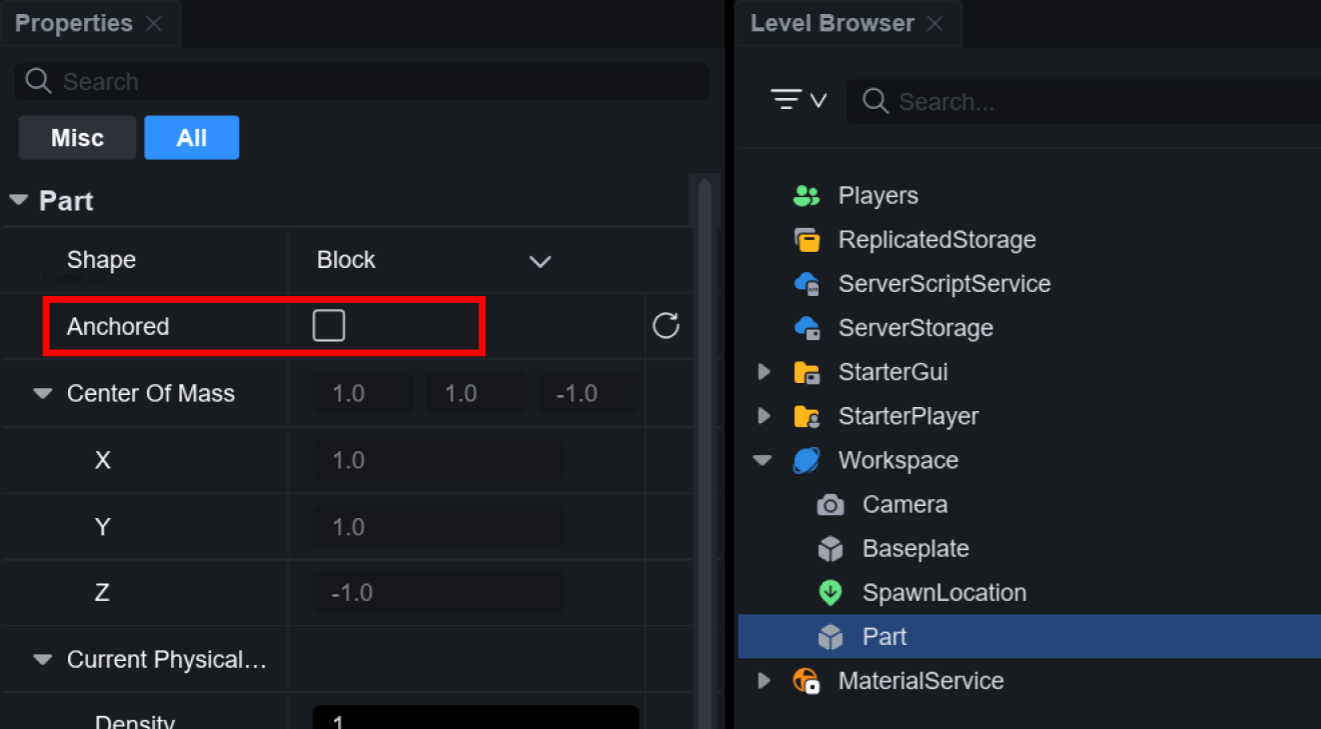
To apply physics effects, select the Part and disable the **Anchored** property.

<figure><img src="https://2064130887-files.gitbook.io/~/files/v0/b/gitbook-x-prod.appspot.com/o/spaces%2FhrvYlLq1mQAq0V0vwPsb%2Fuploads%2Fgit-blob-f1ec3afcb235aca8c4838519544e17e30d8d05ff%2Fimage.png?alt=media" alt=""><figcaption></figcaption></figure>

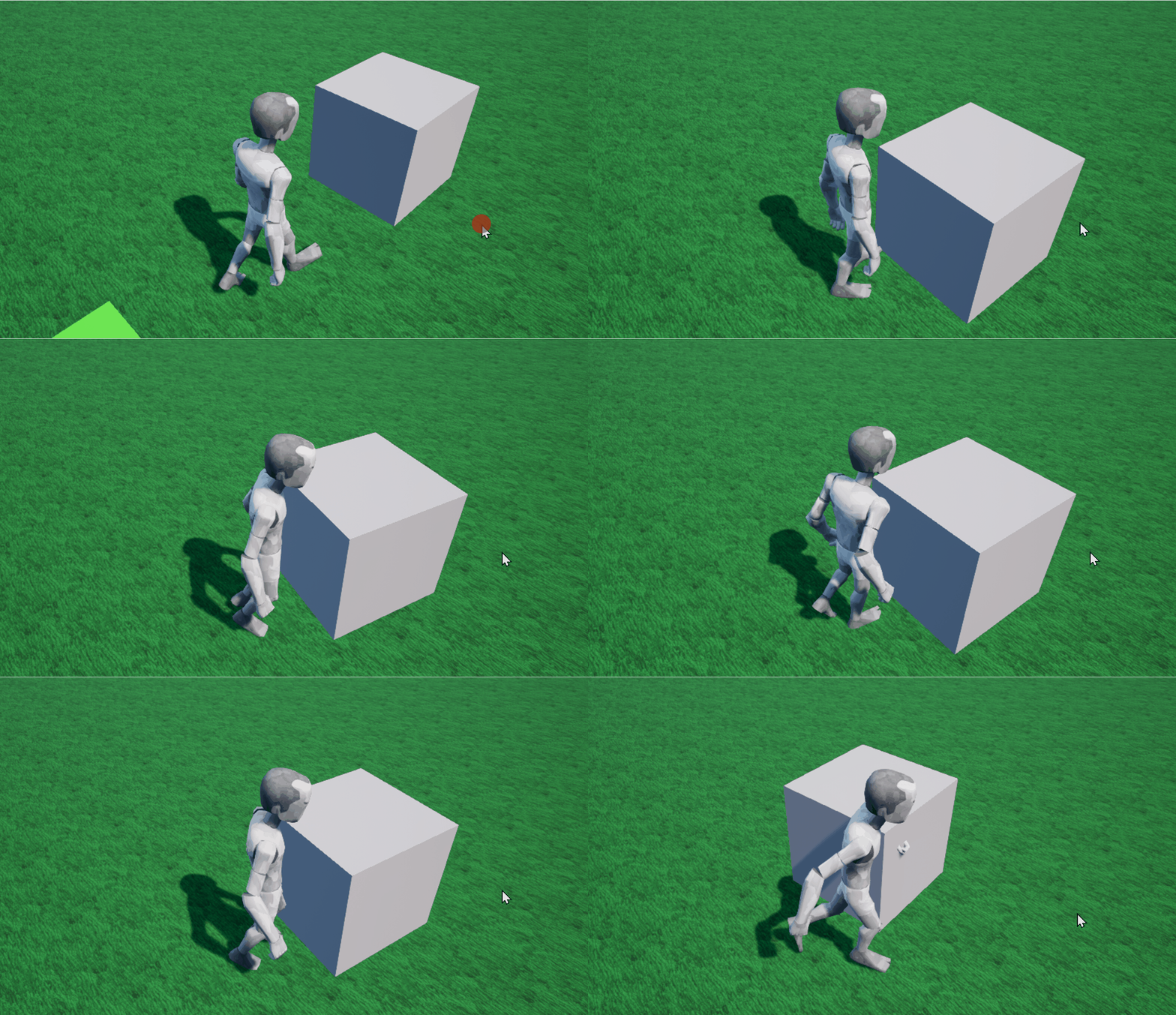
When the Anchored property is disabled, the object will be affected by physical forces and gravity.

<figure><img src="https://2064130887-files.gitbook.io/~/files/v0/b/gitbook-x-prod.appspot.com/o/spaces%2FhrvYlLq1mQAq0V0vwPsb%2Fuploads%2Fgit-blob-0cfddfe1823d637792917105fd4d06452146eac2%2FAnimation.gif?alt=media" alt=""><figcaption></figcaption></figure>

## LinearVelocity <a href="#linearvelocity" id="linearvelocity"></a>

**LinearVelocity** is a physics object that applies a constant linear velocity to an object. This allows the object to move continuously in a specific direction, even when influenced by external forces like gravity or collisions.

### How to Use <a href="#how-to-use" id="how-to-use"></a>

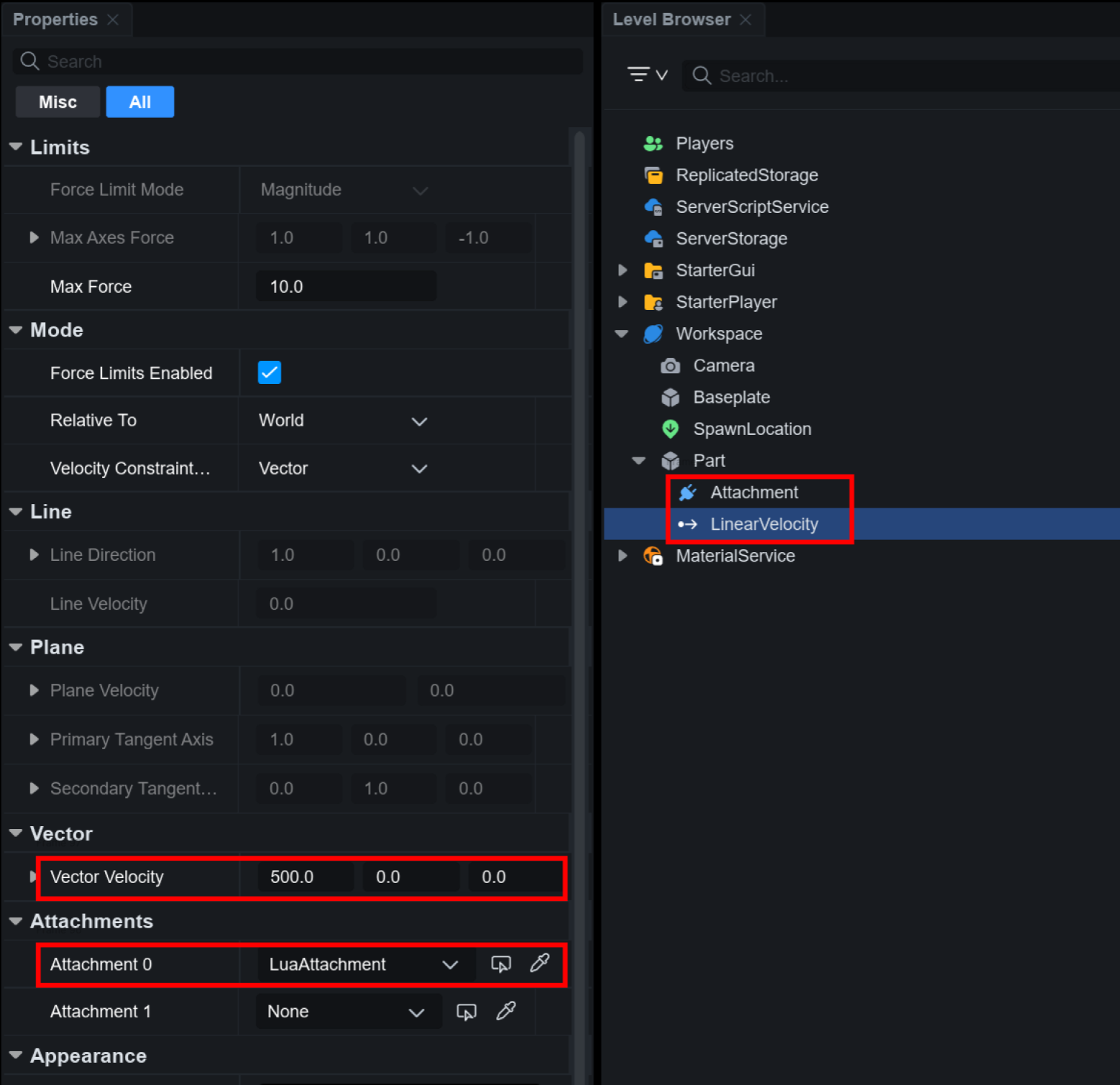
To use LinearVelocity, the Part must have an **Attachment**. First, add an Attachment to the Part, and set the Attachment in the LinearVelocity properties window. Next, specify the physical force (direction of movement) in the **Vector Velocity** property, and the Part will move in that direction.

<figure><img src="https://2064130887-files.gitbook.io/~/files/v0/b/gitbook-x-prod.appspot.com/o/spaces%2FhrvYlLq1mQAq0V0vwPsb%2Fuploads%2Fgit-blob-c8fe328de40ac97a08fd71715d84c490b9279833%2Fimage.png?alt=media" alt=""><figcaption></figcaption></figure>

If the physics effect is not applied, ensure the **Anchored** property of the Part is **disabled**!

### Properties <a href="#properties" id="properties"></a>

<table><thead><tr><th width="212">Property</th><th>Description</th></tr></thead><tbody><tr><td>Force Limit Mode</td><td><p>Sets how the applied force is limited.</p><ul><li>Magnitude: Limits force based on the total vector magnitude</li><li>PerAxis: Allows individual force limits for the X, Y, and Z axes</li></ul></td></tr><tr><td>Max Axes Force</td><td>When Force Limit Mode is "PerAxis," sets the maximum force for each axis.</td></tr><tr><td>Max Force</td><td>When Force Limit Mode is "Magnitude," sets the maximum force that LinearVelocity can apply (in newtons).</td></tr><tr><td>Force Limits Enabled</td><td><p>Determines whether Max Axes Force or Max Force limits are enabled.</p><ul><li>true: Applies the set maximum force limits</li><li>false: No force limits (default)</li></ul></td></tr><tr><td>Relative To</td><td><p>Defines the reference coordinate system for the applied velocity.</p><ul><li>Attachment 0: Applies velocity relative to the first attachment (Attachment0)</li><li>Attachment 1: Applies velocity relative to the second attachment (Attachment1)</li><li>World: Applies velocity based on the world coordinates</li></ul></td></tr><tr><td>Velocity Constraint Mode</td><td><p>Determines how velocity is applied.</p><ul><li>Vector: Directly sets a specific vector velocity (default).</li><li>Line: Sets velocity along a specific line direction</li><li>Plane: Sets velocity within a specific plane.</li></ul></td></tr><tr><td>Line Direction</td><td>When Velocity Constraint Mode is set to "Line," defines the vector direction of movement.</td></tr><tr><td>Line Velocity</td><td>When Velocity Constraint Mode is set to "Line," defines the magnitude of velocity along the line direction.</td></tr><tr><td>Plane Velocity</td><td>When Velocity Constraint Mode is set to "Plane," defines velocity within the plane.</td></tr><tr><td>Primary Tangent Axis</td><td>When Velocity Constraint Mode is set to "Plane," defines the primary tangent axis that determines movement within the plane.</td></tr><tr><td>Secondary Tangent Axis</td><td>When Velocity Constraint Mode is set to "Plane," defines the secondary tangent axis, which must be perpendicular to the primary tangent axis.</td></tr><tr><td>Vector Velocity</td><td>When Velocity Constraint Mode is set to "Vector," specifies the velocity vector to be applied to the object.</td></tr><tr><td>Attachment 0</td><td>Sets the attachment point for LinearVelocity.</td></tr><tr><td>Attachment 1</td><td>Sets the attachment point for LinearVelocity.</td></tr></tbody></table>

### Script Feature <a href="#script-feature" id="script-feature"></a>

```lua
local Part = script.Parent
Part.Anchored = false

local Attachment = Instance.new("Attachment")
Attachment.Parent = Part

local LinearVelocity = Instance.new("LinearVelocity")
LinearVelocity.Attachment0 = Attachment
LinearVelocity.RelativeTo = Enum.ActuatorRelativeTo.World 
LinearVelocity.VectorVelocity = Vector3.new(1000, 0, 0) 
LinearVelocity.MaxForce = 10
LinearVelocity.Parent = Part
```

## VectorForce

VectorForce is a physics object that continuously applies force and acceleration to an object, allowing for gradual change of an object's speed, creating natural movement.

### How to Use

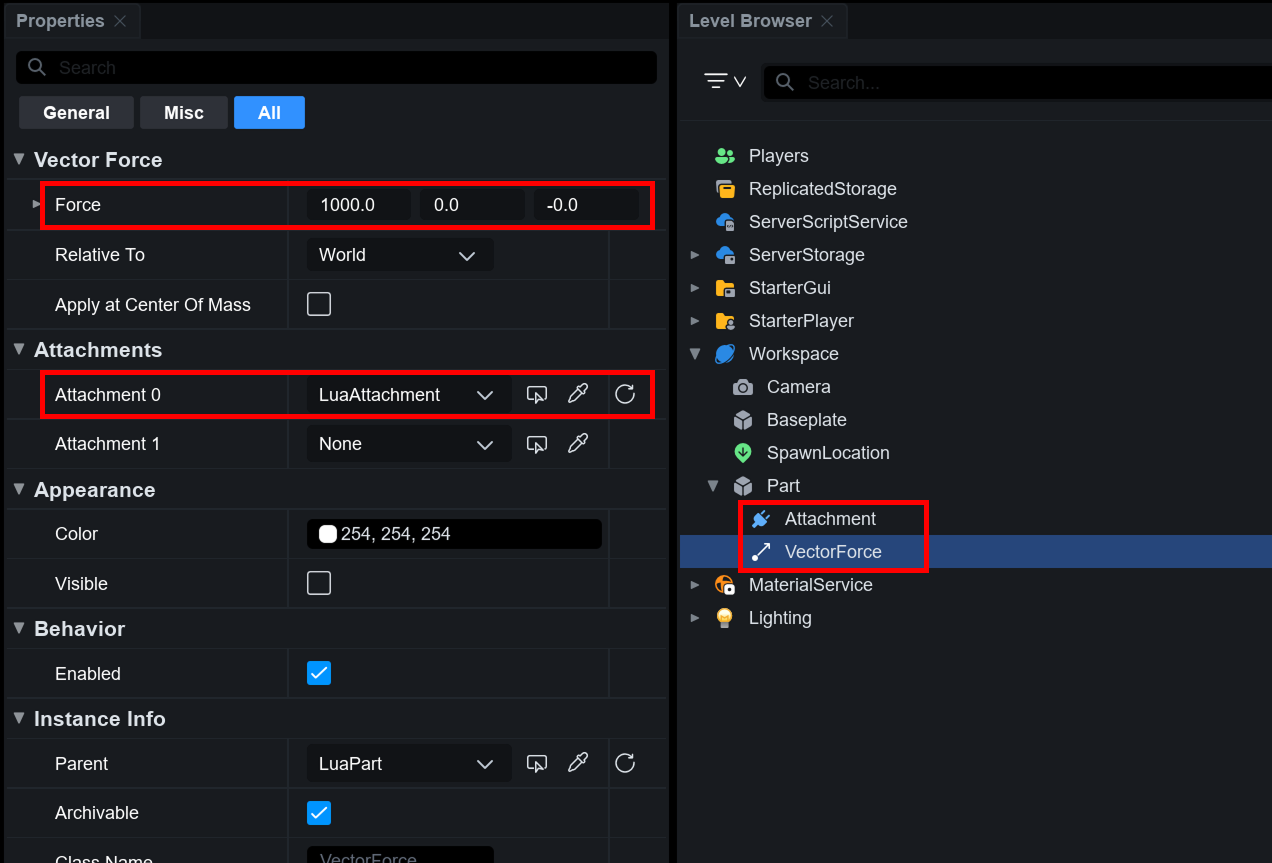
To use VectorForce, the Part must have an **Attachment**. First, add an Attachment to the Part, and set the Attachment in the VectorForce properties window. Next, specify the physical force (direction of movement) in the **Force** property, and the Part will move in that direction.

<figure><img src="https://2064130887-files.gitbook.io/~/files/v0/b/gitbook-x-prod.appspot.com/o/spaces%2FhrvYlLq1mQAq0V0vwPsb%2Fuploads%2Fgit-blob-51ebe0b92762d8c15ae6646a720aa988b8359e93%2FVectorForce.png?alt=media" alt=""><figcaption></figcaption></figure>

If the physics effect is not applied, ensure the **Anchored** property of the Part is **disabled**!

### Properties

<table><thead><tr><th width="212">Property</th><th>Description</th></tr></thead><tbody><tr><td>Force</td><td>Sets the magnitude and direction of the force.</td></tr><tr><td>Apply at Center of Mass</td><td><p>Sets where the force is applied.</p><p>When disabled, the force is applied to the Object's center (center of mass). When enabled, the force is applied at Attachment0's position, which may cause rotation if not at the center.</p></td></tr><tr><td>Relative To</td><td><p>Sets the reference coordinate system for applying force.</p><ul><li>Attachment 0: Applies velocity relative to the first attachment (Attachment0)</li><li>Attachment 1: Applies velocity relative to the second attachment (Attachment1)</li><li>World: Applies velocity based on the world coordinates</li></ul></td></tr><tr><td>Attachment 0</td><td>Sets the attachment point to which VectorForce is applied.</td></tr><tr><td>Attachment 1</td><td>Sets the attachment point to which VectorForce is applied.</td></tr></tbody></table>

### Script Feature <a href="#script-feature-1" id="script-feature-1"></a>

```lua
local Part = script.Parent
Part.Anchored = false

local Attachment = Instance.new("Attachment")
Attachment.Parent = Part

local VectorForce = Instance.new("VectorForce")
VectorForce.Attachment0 = Attachment
VectorForce.RelativeTo = Enum.ActuatorRelativeTo.World 
VectorForce.Force = Vector3.new(500000, 0, 0) 
VectorForce.Parent = Part
```

## AngularVelocity <a href="#angularvelocity" id="angularvelocity"></a>

**AngularVelocity** is a physics object that applies rotational velocity to an object, allowing it to rotate at a constant speed.

### How to Use <a href="#how-to-use-1" id="how-to-use-1"></a>

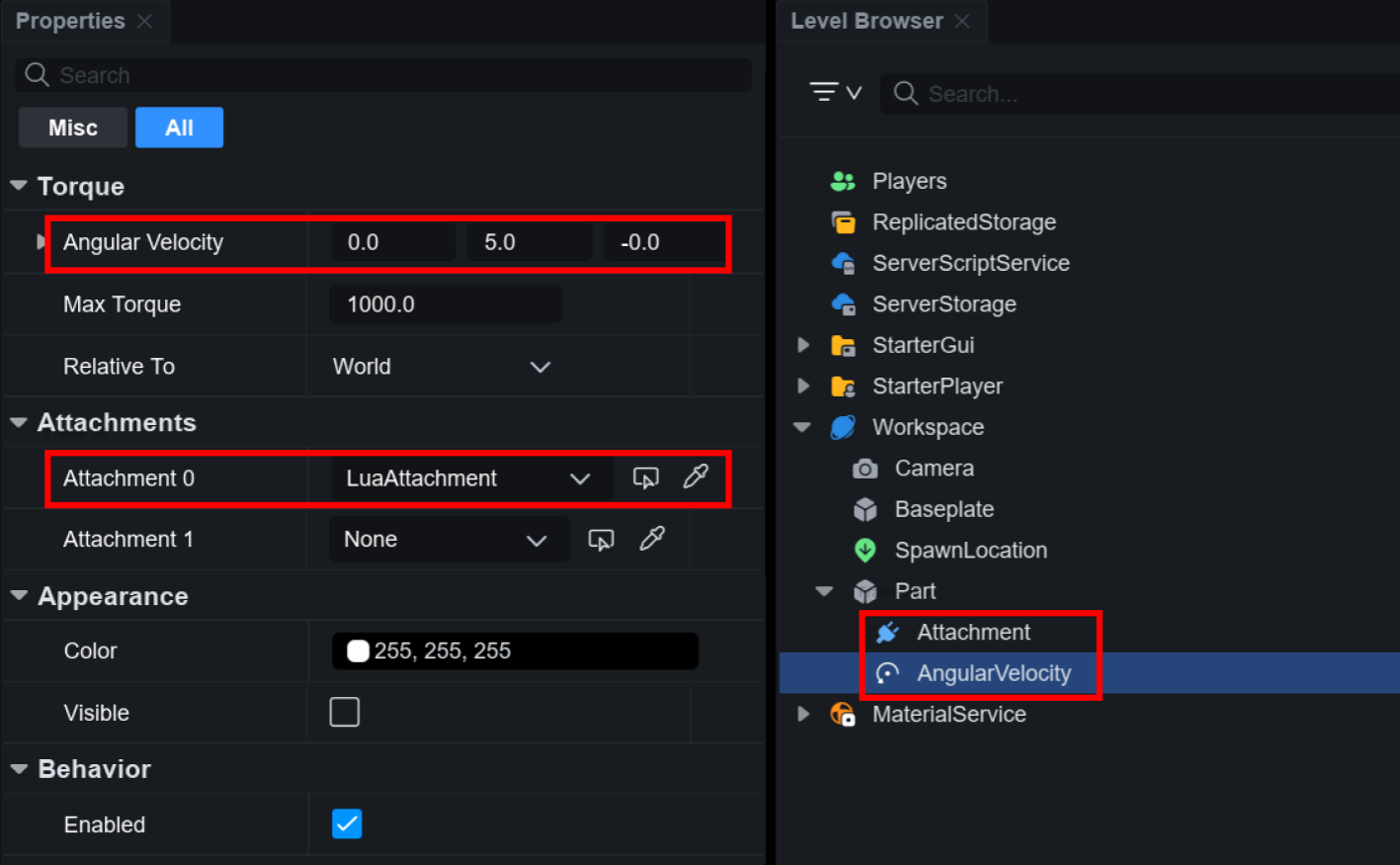
To use AngularVelocity, the Part must have an **Attachment**. First, add an Attachment to the Part, and set the Attachment in the AngularVelocity properties window. Next, specify the physical force (rotation direction) in the **Angular Velocity** property, and the Part will rotate in that direction.

<figure><img src="https://2064130887-files.gitbook.io/~/files/v0/b/gitbook-x-prod.appspot.com/o/spaces%2FhrvYlLq1mQAq0V0vwPsb%2Fuploads%2Fgit-blob-af18feb2a2533145cd149dc8090e30337dc42a1f%2Fimage.png?alt=media" alt=""><figcaption></figcaption></figure>

If the physics effect is not applied, ensure the **Anchored** property of the Part is **disabled**!

### Properties <a href="#properties-1" id="properties-1"></a>

<table><thead><tr><th width="212">Property</th><th>Description</th></tr></thead><tbody><tr><td>Angular Velocity</td><td>A vector that defines the rotational velocity applied to the object.<br>(You can set the rotational speed for the X, Y, and Z axes in radians per second (rad/s).)</td></tr><tr><td>Max Torque</td><td>Sets the maximum rotational force (torque) that can be applied to the object.<br>(If this value is too small, the object may not reach the desired rotational speed.)</td></tr><tr><td>Relative To</td><td><p>Determines the coordinate system for applying rotational velocity.</p><ul><li>Attachment 0: Applies rotation relative to the first attachment point (Attachment0)</li><li>Attachment 1: Applies rotation relative to the second attachment point (Attachment1)</li><li>World: Applies rotation based on the world coordinates</li></ul></td></tr><tr><td>Attachment 0</td><td>Sets the attachment point to which AngularVelocity is applied.</td></tr><tr><td>Attachment 1</td><td>Sets the attachment point to which AngularVelocity is applied.</td></tr></tbody></table>

### Script Feature <a href="#script-feature-1" id="script-feature-1"></a>

```lua
local Part = script.Parent
Part.Anchored = false

local Attachment = Instance.new("Attachment")
Attachment.Parent = Part

local AngularVelocity = Instance.new("AngularVelocity")
AngularVelocity.Attachment0 = Attachment
AngularVelocity.AngularVelocity = Vector3.new(0, 3, 0) 
AngularVelocity.MaxTorque = math.huge 
AngularVelocity.RelativeTo = Enum.ActuatorRelativeTo.World
AngularVelocity.Parent = Part
```

## Applying Physics to Humanoid <a href="#applying-physics-to-humanoid" id="applying-physics-to-humanoid"></a>

### LinearVelocity

```lua
local Attachment = Instance.new("Attachment")
Attachment.Parent = HumanoidRootPart

local LinearVelocity = Instance.new("LinearVelocity")
LinearVelocity.Attachment0 = Attachment
LinearVelocity.RelativeTo = Enum.ActuatorRelativeTo.World 
LinearVelocity.VectorVelocity = Vector3.new(0, 0, -500) 
LinearVelocity.MaxForce = 10
LinearVelocity.Parent = HumanoidRootPart	
```

### VectorForce

```lua
local Attachment = Instance.new("Attachment")
Attachment.Parent = HumanoidRootPart

local VectorForce = Instance.new("VectorForce")
VectorForce.Attachment0 = Attachment
VectorForce.RelativeTo = Enum.ActuatorRelativeTo.World
VectorForce.Force = Vector3.new(1000, 0, 0) 
VectorForce.Parent = HumanoidRootPart
```

### AngularVelocity

```lua
local Attachment = Instance.new("Attachment")
Attachment.Parent = HumanoidRootPart

local AngularVelocity= Instance.new("AngularVelocity")
AngularVelocity.Attachment0 = Attachment
AngularVelocity.RelativeTo = Enum.ActuatorRelativeTo.World
AngularVelocity.MaxTorque = 1000
AngularVelocity.AngularVelocity = Vector3.new(0, 10, 0) 
AngularVelocity.Parent = HumanoidRootPart
```

### ApplyImpulse

```lua
local LookVector = HumanoidRootPart.CFrame.LookVector
HumanoidRootPart:ApplyImpulse(LookVector * 100000)
```

### AssemblyLinearVelocity

```lua
local LookVector = HumanoidRootPart.CFrame.LookVector
HumanoidRootPart.AssemblyLinearVelocity = LookVector * 1500
```